

Why my website is invisible in AI search is usually not answered by one ranking report or one chatbot test. “Invisible” can mean a crawler cannot reach the site, the page delivers too little usable content, the business is poorly understood, the answer engine did not retrieve the page for a particular prompt, or the platform retrieved it but selected another source. Each symptom needs different evidence and a different fix.
This guide gives you a practical diagnostic path. You will test three representative URLs, separate access failures from rendering and citation gaps, rank fixes by impact and risk, and define what proof is strong enough to call an issue resolved. The goal is readiness and evidence—not a promise that any AI system will mention, cite, or recommend your website.
Quick diagnosis: the most likely causes
- Access failure: robots rules, authentication, WAF policies, rate limits, CAPTCHAs, or server errors prevent a relevant crawler from fetching the page.
- Delivery or rendering failure: the URL returns 200, but important copy, links, product data, or organisation details are missing from usable output.
- Search eligibility failure: noindex directives, canonical mistakes, redirects, duplicates, or weak discovery keep a page out of an index that powers an AI feature.
- Understanding gap: the page does not make its subject, publisher, offer, expertise, or evidence sufficiently clear.
- Retrieval or citation gap: the page is accessible and useful, but another source better satisfies the query—or the platform does not select it in the observed run.
- Measurement gap: the site may appear for some prompts, modes, places, or dates, but the test is too narrow to observe it reliably.
Symptom map: access failure vs rendering failure vs discovery or citation gap
Treat AI visibility as a chain of stages rather than one score. A page must first be discoverable, fetchable, and usable. It must then be eligible for the relevant retrieval system, understandable in context, useful for a query, and competitive with alternative sources. A failure at one stage can resemble another when you only inspect the final answer.
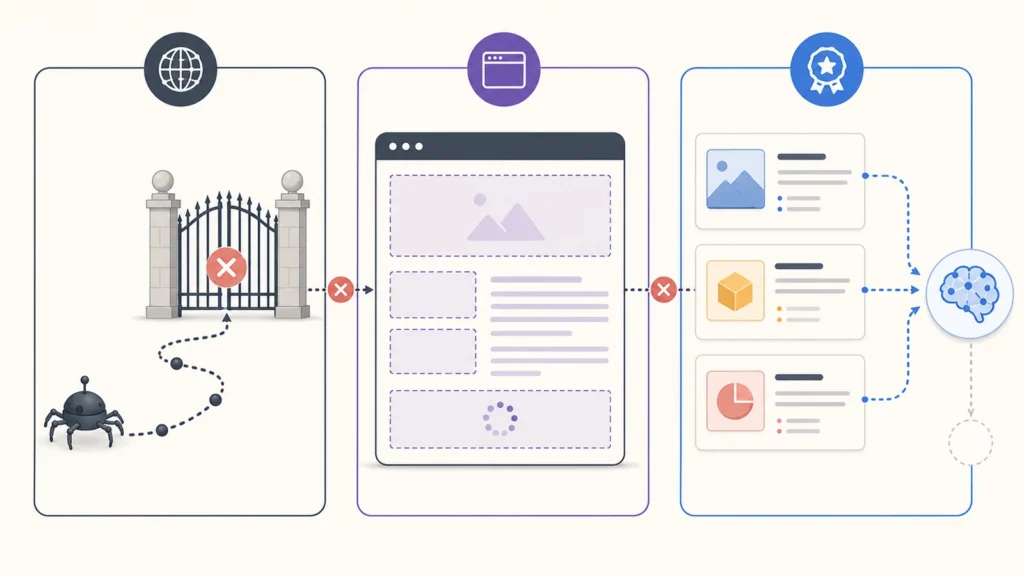
| Observed symptom | Likely layer | Evidence to collect |
|---|---|---|
| 401, 403, 429, CAPTCHA, or repeated 5xx | Access or infrastructure | Request identity, timestamp, status, headers, response, redirect chain and server/WAF log |
| 200 response but main content is absent | Delivery or rendering | Initial HTML, rendered DOM, loaded resources and template comparison |
| Page is not indexed where eligibility is required | Discovery or index control | Robots, meta/X-Robots-Tag, canonical, sitemap, internal links and inspection data |
| Business facts conflict across pages | Entity clarity | Visible copy, about/contact details, authorship, structured data and corroboration |
| Healthy page is not cited for one prompt | Retrieval or selection | Exact prompt, platform/mode, date, location, repeats, full answers and citations |
| No reliable baseline exists | Measurement | Stable prompt set, representative URLs, dated records and repeat rules |
Test 1: reproduce the issue on representative URLs
Do not begin with the entire website. Choose the homepage, one commercial page that should generate revenue, and one substantial knowledge article. Add another URL only when the symptom belongs to a distinct template such as a product, location, documentation, or category page.
- Write the intended result first. Record the page purpose, audience, canonical URL, intended index state, primary entity, and one question it should answer.
- Save the test conditions. Include date, deployment version, request identity, rendering method, platform mode, location, account state, and exact prompt where relevant.
- Reproduce before changing anything. Preserve the failing response, empty render, incorrect directive, contradiction, or missing citation as baseline evidence.
- Compare templates. If all three pages fail identically, investigate shared infrastructure or templates before editing individual copy.
Diagnostic rule: describe what you observed, not what you assume. “OAI-SearchBot received 403 at 10:15 UTC” is evidence. “ChatGPT hates our website” is not.
Test 2: run the same readiness checks across three page types
Apply the identical checklist to the homepage, commercial page, and knowledge article. Consistency matters because changing the test between pages makes results difficult to compare.
| Check | Homepage | Commercial page | Knowledge article |
|---|---|---|---|
| HTTP and redirect | Expected final URL and 200 | Expected final URL and 200 | Expected final URL and 200 |
| Usable content | Identity and offer present | Offer, evidence and next action present | Answer, author, sources and update context present |
| Index controls | Intended robots and canonical | Intended robots and canonical | Intended robots and canonical |
| Entity clarity | Name, category, location and contacts agree | Service and provider relationship is explicit | Author, publisher, topic and claims are explicit |
| Citation readiness | Primary facts are attributable | Commercial claims have support | Original insight, sources and dates are visible |
A single passing page is not proof that the site is healthy. A single failing page is not proof that the domain is blocked. The pattern across the sample tells you where to expand the audit.
Root-cause checks: directives, status, security, delivery and entity signals
1. Confirm the right crawler and purpose
Crawler controls are platform-specific. OpenAI documents OAI-SearchBot for surfacing websites in ChatGPT search, GPTBot for potential model-training use, and ChatGPT-User for certain user-triggered actions. These controls are independent. Blocking GPTBot does not automatically opt a site out of ChatGPT search; OAI-SearchBot is the relevant documented control for that search surface.
Anthropic currently distinguishes ClaudeBot for model development, Claude-SearchBot for search quality, and Claude-User for user-directed retrieval. Perplexity distinguishes PerplexityBot for search indexing from Perplexity-User for user actions. Test the crawler that matches the symptom and consult current official documentation because names, policies, and IP ranges can change.
2. Check robots.txt and page-level controls
Read the final robots.txt served from every relevant host and subdomain. Confirm the specific user agent reaches the intended rule group and a broad wildcard rule does not create a conflict. Then inspect meta robots and X-Robots-Tag headers. Robots permission only governs crawling; it does not guarantee indexing, retrieval, or citation.
3. Inspect HTTP behaviour beyond a browser visit
Record the full redirect chain and final status. Investigate intermittent 403, 429, 5xx, soft errors, geo-dependent responses, cookie walls, login requirements, and security challenges. A normal browser request may pass while a crawler identity or published IP range receives a block. Avoid allowing traffic based only on a spoofable user-agent string; use current provider verification guidance and logs.
4. Compare source delivery with rendered meaning
A successful response can still be unusable. Check whether the title, H1, main explanation, ordinary links, product facts, author information, and important media or transcripts exist in the initial response or reliably rendered output. Look for blocked JavaScript, API failures, delayed hydration, client-only navigation, placeholder shells, and content that appears only after interaction.
5. Validate conventional search eligibility
Google’s current guidance says eligibility for supporting links in AI Overviews and AI Mode depends on being indexed and eligible to appear in Google Search with a snippet; Google does not require special AI-only markup. Verify Googlebot access, a successful response, indexable content, appropriate controls, useful internal discovery, and the relevant Search inspection evidence.
6. Clarify entities, claims and provenance
Make it easy to identify who published the page, what the organisation does, which entity the page describes, who authored or reviewed it, what is original, which sources support time-sensitive claims, and when it was updated. Structured data can reinforce visible meaning, but hidden markup cannot rescue vague or contradictory copy.
Fixes ordered by impact, effort and risk
Prioritise the earliest confirmed barrier with the widest affected coverage. Do not rewrite dozens of articles while a shared firewall rule blocks the crawler, and do not loosen security for an unverified bot because one prompt lacked a citation.
| Priority | Example fix | Impact | Risk and safeguard |
|---|---|---|---|
| Critical | Remove unintended authentication, 403/429, CAPTCHA, 5xx, noindex, or wrong canonical | Restores a required access or eligibility condition | Limit scope, verify identity and preserve rollback |
| High | Restore meaningful delivered/rendered content and crawlable links on a broken template | Improves discovery and understanding across many URLs | Test representative templates before rollout |
| High | Correct conflicting business, product, author and publisher facts | Improves trust and entity clarity | Create a single factual source and owner |
| Important | Add first-party evidence, dates, methods, sources and author context | Improves usefulness and citation readiness | Do not manufacture expertise or claims |
| Important | Improve topic hubs, descriptive internal links, sitemaps and orphan discovery | Improves discovery | Avoid indiscriminate sitewide links |
| Monitor | Expand stable prompt coverage and repeat observations | Improves measurement | Do not treat prompt counts as business outcomes |
A safe remediation sequence
- Capture a revision and baseline. Save configuration, evidence, affected URLs, and rollback instructions.
- Make the smallest scoped change. Address the observed cause without widening access unnecessarily.
- Verify the technical condition immediately. Repeat the same request and rendering checks.
- Check adjacent pages and users. Confirm security, analytics, usability and unrelated crawler rules still work.
- Allow for reprocessing. Crawling, indexing, retrieval and citation changes may lag behind a server-side fix.
- Repeat platform observations later. Preserve prompts and document dates, modes, answers and citations.
Verification: exact evidence that proves the issue is resolved

A fix is verified when the failing condition changes under the same test and the new state persists across the relevant sample. Access is proven by an expected response to the verified crawler request. Rendering is proven when important text, links, facts, and media are present in usable output. Index controls are proven when intended directives and canonicals are served consistently, with later processing evidence where available.
Entity clarity is proven when key business and author facts agree across visible pages and matching structured data. Citation readiness is proven when important claims have context, provenance, dates and sources—but that remains a content-quality pass, not a citation guarantee. A platform mention or citation should be reported with its prompt, conditions, frequency, and selected URL.
When the website is healthy but the platform still does not cite it
If access, rendering, index eligibility, entity clarity, and content quality all pass, the remaining explanation may be competitive selection rather than a technical defect. Another source may be more authoritative, specific, current, original, or directly relevant. Results may also vary across prompts, modes, accounts, locations, and dates.
Stop making speculative technical changes. Improve the underlying asset with original data or experience, complete answers, primary sources, disclosed methods, current facts, genuine references, and coherent internal relationships. Then measure a stable set of customer-relevant prompts over time.
A healthy site proves that tested site-side barriers were absent or corrected under recorded conditions. It does not prove that every platform indexed the page, a prompt will retrieve it, it will outrank competing evidence, or future answers will cite it.
Evidence and screenshots to include
Preserve the affected URL, date and timezone, request identity, status and redirect chain, relevant headers, robots rule, source or rendered output, and the expected-versus-observed difference. For platform tests, save the full prompt and answer, cited URLs, platform and mode, account state where relevant, location, repeat count, and whether the result was a mention, citation, or neither.
Crop screenshots only for presentation and keep the complete raw record. Redact credentials and personal data. Never fabricate logs, Search Console screens, or citations. If evidence is unavailable, label the result “unknown” and specify the next test.
The common interpretation mistake
The most common mistake is confusing conventional rankings with proof that every AI system can discover and use the website. Strong Google performance is useful evidence of search eligibility, relevance, and authority, but it does not prove access by every other crawler or retrieval for every AI prompt.
The reverse is equally misleading: a 200 response or allowed robots rule does not mean a page should be cited. Access is only the first gate. Report discovery, access, delivery, index eligibility, understanding, retrieval, mention, citation, and business results separately.
Frequently asked questions
Why is my website not showing in ChatGPT search?
Verify OAI-SearchBot access using OpenAI’s current documentation, then check server/WAF responses, delivered content, internal discovery, and page relevance. Absence from one answer does not prove a block; record stable prompts and cited URLs before drawing a conclusion.
Does allowing AI crawlers guarantee citations?
No. Allowing a relevant crawler removes one possible access barrier. Indexing, retrieval, ranking, mention, recommendation, and citation remain separate platform decisions.
Can robots.txt make my site invisible in Google AI Overviews?
Blocking Googlebot can prevent the crawling needed for Search eligibility. Google states that supporting links in AI Overviews and AI Mode must be indexed and eligible to appear with a snippet. Check the full Search eligibility chain, not a separate AI-only rule.
Should I allow every AI bot?
Not automatically. Decide which product uses align with your publishing, privacy, security, licensing, and commercial goals. Search, training, and user-triggered agents can use different controls. Apply deliberate rules and verify identities with current official guidance.
How long after a fix should AI visibility improve?
The technical condition can often be retested immediately, but crawling, indexing, retrieval, and answer selection update on different schedules. OpenAI and Perplexity currently note that certain robots changes may take about 24 hours to be reflected; broader visibility can take longer and is not guaranteed.
Is llms.txt required to appear in AI search?
No universal requirement exists. Google’s July 2026 guidance explicitly says it does not use llms.txt for Google Search or its generative AI features. Treat emerging conventions as controlled experiments, not substitutes for crawlability, index eligibility, clear content, and evidence.
Next step: diagnose before you optimise
If you are still asking why my website is invisible in AI search, begin with the earliest stage you can prove. Test a homepage, a commercial page, and a knowledge article. Fix confirmed access and rendering failures first; then improve entity clarity, evidence, usefulness, and measurement.
Use the AI search readiness checklist, follow the repeatable testing method, compare AI readiness with a traditional SEO audit, or review what an evidence-based readiness audit should deliver.
Visible Pilot is building a practical way to detect website conditions that interfere with discovery across Google Search and AI-assisted search systems.
Get the AI Search Readiness checklist and record your baseline before changing the site.