

If ClaudeBot is blocked by Cloudflare, the first job is to identify which control produced the block. A robots.txt rule, Cloudflare AI crawler policy, WAF rule, bot protection setting, rate limit, or origin restriction can all create a similar symptom. The fix depends on the layer—and allowing a user-agent string alone is not reliable proof that a real Anthropic crawler can reach your content.
Quick answer: check Cloudflare AI Crawl Control and Security Events first, then compare robots.txt policy with the actual edge response. A successful test should show an allowed, authenticated crawler request receiving the intended 2xx page—not merely a browser request with “ClaudeBot” in its user-agent.
Quick diagnosis: why ClaudeBot is blocked by Cloudflare
The most likely cause is an explicit AI crawler policy set to Block. Cloudflare can also add or enforce rules through its AI controls, while custom WAF rules and broader bot-management settings may terminate the request earlier. A 403 usually points to an access-control decision; a 402 may be a deliberate paid-crawl response; repeated 429 responses suggest rate limiting.
Start in Cloudflare’s AI Crawl Control dashboard. Filter activity by Anthropic or ClaudeBot and review the action, affected hostname, requested path, and status-code distribution. Then open Security Events for the same time window. The matched rule and action are more useful than guessing from the response page.
Access failure, rendering failure, or citation gap?
These problems are often grouped together, but they require different evidence. An access failure means the edge or origin denies the request. A rendering failure means the crawler receives a response but important content is absent, delayed, or dependent on unsupported client-side behavior. A discovery or citation gap means the page is technically available but is not selected or surfaced.
| Symptom | Evidence | Likely layer |
| 403 or 402 | Cloudflare event and edge status | AI policy or WAF |
| 200 but thin HTML | Response body lacks main content | Rendering or origin |
| 200 with complete content | Clean fetch and logs | Discovery, quality, or citation |
Test 1: reproduce the problem on representative URLs
Choose three URLs: the homepage, a typical article, and one template that appears affected. Record the final URL, timestamp, response status, redirect chain, response headers, and whether the HTML contains the primary heading and body copy. Testing several templates prevents a path-specific rule from looking like a sitewide problem.
curl -I https://example.com/article/
curl -L -o /dev/null -s -w '%{http_code} %{url_effective}\n' https://example.com/article/
Important: changing curl’s user-agent to ClaudeBot can reproduce a user-agent-based rule, but it does not authenticate the request as Anthropic. Treat that test as a diagnostic clue, not proof of verified-bot access.
Test 2: compare a browser request with a controlled crawler-identity request
Compare the normal request with a controlled request that sends the relevant crawler name. If the browser gets 200 and the labeled request gets 403, search Cloudflare events for a user-agent, bot-category, detection-ID, or custom-expression match. If both succeed, the original block may be intermittent, IP-based, rate-based, or limited to a different path.
curl -A 'ClaudeBot' -I https://example.com/article/Do not allow every request that claims to be ClaudeBot. User-agent strings are easy to spoof. Prefer Cloudflare’s managed crawler identification and verified-bot signals where your plan and rule system expose them. Keep login, checkout, account, search, and expensive application routes protected even if public editorial pages are allowed.
Root-cause checks in the correct order
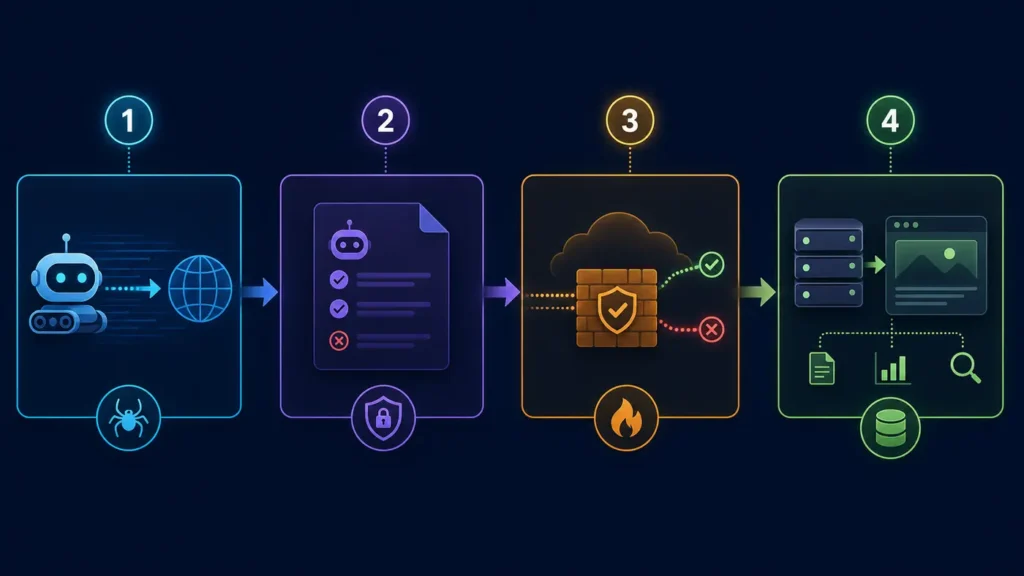
- Robots policy: fetch the exact host’s /robots.txt and check the most specific matching group for ClaudeBot.
- Cloudflare AI policy: confirm whether ClaudeBot or Anthropic’s training category is set to Allow or Block.
- WAF and bot rules: identify the exact rule, phase, and action recorded in Security Events.
- Rate limits and challenges: look for 429 responses, managed challenges, or JavaScript-dependent interstitials.
- Origin behavior: verify that Cloudflare is not passing the request to an origin firewall that rejects it.
- Content delivery: confirm a 2xx response includes canonical HTML, meaningful text, and stable links.
Anthropic distinguishes ClaudeBot from Claude-SearchBot and Claude-User. ClaudeBot is associated with collecting web content that may contribute to model training. Claude-SearchBot supports search-result quality, and Claude-User supports user-directed retrieval. Decide which purposes you want to permit; do not assume one rule controls all three.
Fixes ordered by impact, effort, and risk
First, reverse any accidental block in AI Crawl Control for the crawler purpose you actually want to support. Second, narrow conflicting WAF rules to protected paths instead of disabling security across the domain. Third, remove blanket challenges from public content where they are unnecessary. Fourth, tune rate limits conservatively and watch traffic after the change.
If your policy intentionally blocks training collection, leave ClaudeBot blocked and evaluate Claude-SearchBot and Claude-User separately. That is a governance choice, not automatically an SEO error. The objective is consistent, documented policy—not maximum access for every automated agent.
Safer pattern: allow verified crawler traffic only to public, cacheable content; retain normal protection for private, transactional, personalized, and computationally expensive endpoints.
Verification: evidence that proves the issue is resolved
A complete verification record should include the exact URL and time, a Cloudflare event showing the request was allowed or no longer matched the blocking rule, a 2xx final response after redirects, the expected canonical URL, and server or edge logs confirming delivery. Save before-and-after screenshots of the crawler action and status-code trend.
Retest the same representative URL set after cache and rule propagation. Then monitor for several days. A single 200 response proves availability at that moment; it does not prove every template is reachable or that a platform will index, retrieve, or cite the content.
When the site is healthy but Claude still does not cite it
Once access and rendering are healthy, shift the investigation away from Cloudflare. Check whether the page answers a specific question clearly, uses descriptive headings, exposes the main content in the initial HTML, links to supporting evidence, identifies the responsible organization, and has strong internal links. Citation selection is platform-dependent and cannot be guaranteed by crawler access.
Also verify that the content is original and worth retrieving. Pages that repeat generic advice without evidence, examples, or distinct analysis may be accessible yet still offer little citation value. Technical access is a prerequisite, not a ranking promise.
Evidence to capture for future audits
- The robots.txt response and the directive that applies to each Anthropic crawler.
- Cloudflare AI Crawl Control action and status-code distribution.
- Security Event details: rule ID, action, hostname, path, and timestamp.
- Request and response headers, redirect chain, and final HTML sample.
- Edge or origin logs tied to the same request window.
- A dated record of the change, its owner, and the rollback plan.
Common interpretation mistake
The most common mistake is believing that a 200 response from curl with a ClaudeBot user-agent proves the real crawler is allowed. It proves only that one unauthenticated request received 200. A trustworthy conclusion combines managed bot identification, Cloudflare events, network evidence, and the origin response. The second mistake is expecting access changes to create immediate citations; discovery and selection can lag or may never occur.
Frequently asked questions
Should I allow ClaudeBot in Cloudflare?
Allow it only if your organization is comfortable permitting the training-related crawler to access designated public content. Anthropic provides separate controls for ClaudeBot, Claude-SearchBot, and Claude-User, so set policy by purpose.
Why does robots.txt allow ClaudeBot but Cloudflare returns 403?
Robots.txt expresses a crawl preference; it does not override an enforcing WAF, AI crawler policy, challenge, rate limit, or origin firewall. Review the matched Cloudflare Security Event to find the active control.
Does a 200 response guarantee Claude will cite my page?
No. It demonstrates access for that request. Search discovery, retrieval, relevance, content quality, and citation selection are separate platform decisions.
Can I allow ClaudeBot only on my blog?
Yes, use path-scoped controls where supported. Keep sensitive or expensive endpoints protected and document any interaction between AI Crawl Control and custom WAF rules.
Which official sources should I check?
Review Anthropic’s crawler guidance and Cloudflare’s AI Crawl Control analytics documentation. Cloudflare’s custom rules guide explains how managed settings and WAF logic interact.
Next step
Use the AI Search Readiness checklist to audit crawler policy, HTTP access, rendering, discoverability, and citation signals as separate layers. Then connect the findings to the broader AI Crawler Access and Blocking Guide.
For the next issue in this troubleshooting series, see PerplexityBot returns 403 on my website.