

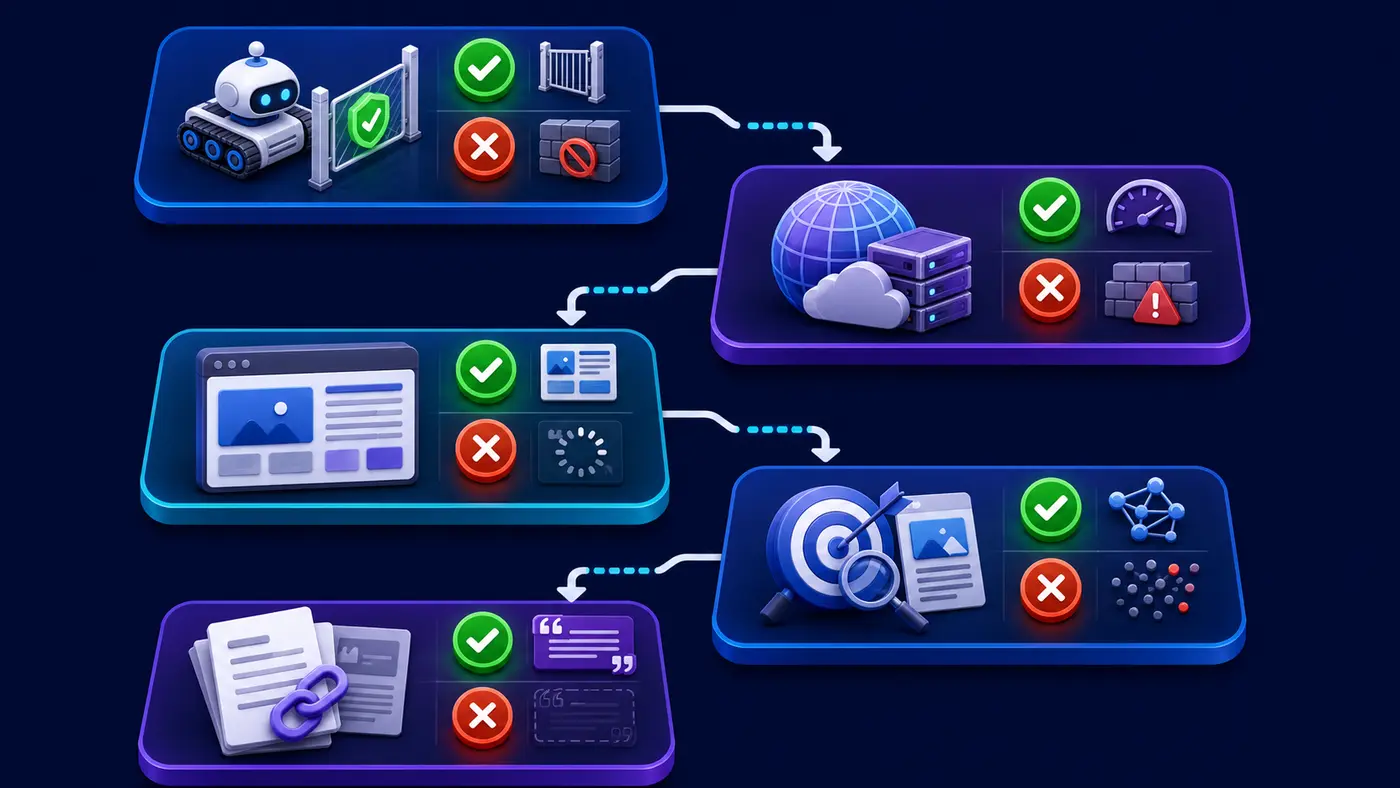
If you are asking “why Claude ignores my website?”, do not assume the answer is a hidden penalty or a single crawl setting. A website can be public yet unavailable to Anthropic’s search systems, technically fetchable yet difficult to interpret, relevant yet undiscovered, or known but not selected for a particular answer. The practical solution is to identify which layer fails and repair that layer with evidence.
Quick answer: Allow the Anthropic bot that matches your goal, return a stable HTTP 200 response without firewall challenges, put the main answer in accessible HTML, and make the page uniquely useful for the query. Even after every technical test passes, Claude is not guaranteed to mention or cite the page.
Why Claude ignores my website: identify the real symptom
“Ignored” can describe several different outcomes. Claude may fail to open a URL supplied by a user. Claude’s web search may not surface the page for a relevant prompt. Your logs may show no Anthropic crawler visits. Or Claude may answer the question while citing another source. Those symptoms require different fixes, so begin by writing down exactly what happened, which Claude product or mode was used, the prompt, the date, and the URL tested.
- User-directed retrieval failure: Claude cannot fetch a page when a user asks it to open that URL.
- Search discovery failure: Claude search does not find the page for a query it should answer.
- Delivery failure: an Anthropic bot receives a block, challenge, timeout, redirect loop, or server error.
- Rendering or comprehension gap: the page loads, but its useful facts are absent from the returned document or difficult to identify.
- Selection gap: the page is accessible and relevant, but a clearer, fresher, or better-supported source is chosen.
Understand ClaudeBot, Claude-User, and Claude-SearchBot
Anthropic’s current publisher guidance describes three separate robots. ClaudeBot collects public web content that could contribute to model training. Claude-User supports user-initiated retrieval when a person asks Claude to access a website. Claude-SearchBot navigates the web to improve search relevance and accuracy. These purposes are not interchangeable.
Important: If your goal is visibility in Claude’s web search, blocking Claude-SearchBot can reduce discovery. If users cannot ask Claude to retrieve your page directly, review Claude-User access. Your decision about ClaudeBot training access is separate and should reflect your own policy.
Step 1: test whether the page is genuinely public
Choose three representative URLs: your homepage, one service or product page, and one detailed article. Open each final canonical URL in a private browser session. The page should not require a login, a mandatory location choice, a consent interaction that hides all content, or a temporary session token. Check that the final URL is stable and that the server returns HTTP 200 rather than a soft error page.
Record the status code, redirect path, canonical URL, response time, and response body. Repeat the test from more than one location if your CDN uses geographic rules. A successful visit in your normal browser is not proof that an automated request receives the same response.
curl -I -L https://example.com/page/
curl -L https://example.com/robots.txt
Step 2: inspect robots.txt for all three Anthropic agents
Open the robots.txt file in the root of every relevant subdomain. Search for ClaudeBot, Claude-User, Claude-SearchBot, and broad wildcard rules. Anthropic states that its bots honor robots.txt directives and that blocking must be configured for each subdomain you want to control. A broad User-agent: * rule can also affect access even when no Anthropic-specific group appears.
User-agent: Claude-SearchBot
Allow: /

User-agent: Claude-User
Allow: /

# Set ClaudeBot separately according to your training policy.
Security rule: Never make private dashboards, customer records, staging sites, or account pages public for AI visibility. robots.txt is a crawl preference, not an access-control system. Protect sensitive material with authentication and authorization.
Step 3: check the CDN, firewall, and bot controls
A robots.txt allowance does not override a web application firewall. Review CDN and server logs for 403, 429, 5xx, JavaScript challenge, CAPTCHA, browser-integrity, and rate-limit events. Pay attention to rules applied by country, network, user agent, path, or request frequency. Anthropic says its bots do not attempt to bypass CAPTCHAs, so a challenge can function as a hard stop.
Do not disable security globally or trust a request merely because it claims an Anthropic user agent. Use the official IP information referenced by Anthropic, retain the firewall event, and make the narrowest safe change. Then repeat the same URL test and confirm that the response body contains the real page rather than a challenge template.
Step 4: confirm the useful content is delivered
A 200 response can still be useless. Compare raw HTML with the fully rendered page. The title, main heading, company or product name, direct answer, supporting evidence, author or organization, and update date should be present in meaningful document structure. If the page is mainly a JavaScript shell, move essential information into server-rendered HTML or use progressive enhancement.
- Use one descriptive H1 and logically nested H2 and H3 headings.
- State the primary answer early instead of hiding it behind tabs or sliders.
- Use real text for important facts rather than placing the only explanation in an image.
- Add descriptive internal links from relevant hub and supporting pages.
- Keep canonical tags, XML sitemaps, navigation, and redirects consistent.
- Remove accidental noindex directives from pages intended for public discovery.
Step 5: make the page worth selecting
Technical access only makes selection possible. Claude still needs a reason to use your page for a particular question. A generic summary that repeats stronger sources may be ignored even when perfectly crawlable. Define the subject precisely, answer a narrow intent, show firsthand examples or original data, explain limitations, and cite primary sources for important claims.
Strengthen entity clarity by stating who publishes the page, what the organization does, who reviewed it, and when the information changed. Avoid unsupported superlatives. Structured data can describe a page, but it cannot compensate for thin, duplicated, or inaccessible information.
Best diagnostic principle: Prove access, delivery, readability, relevance, and citation as separate stages. Passing one stage does not guarantee the next.
Test Claude visibility with a fixed prompt set
Use fresh sessions and a small set of repeatable prompts. Test a brand question, a page-topic question, a problem the page solves, and a request that naturally needs sources. Record whether the website is found, mentioned, linked, or cited. Keep the exact wording, answer, cited URLs, date, and Claude mode so the before-and-after comparison is meaningful.
- Brand: “What does [brand] do?”
- Topic: “Explain [specific topic] using current sources.”
- Problem: “How can I solve [problem the page answers]?”
- Source request: “Find a detailed guide about [subject] and cite it.”
Do not keep changing the prompt until your page appears and then count that one answer as proof. AI answers vary with wording, available sources, freshness, geography, and session conditions. Use the same tests before and after a documented change.
Prioritize fixes by impact and risk
- Critical: repair authentication mistakes, redirect loops, 5xx errors, accidental noindex, and crawler rules that conflict with your intended policy.
- High impact: correct CDN challenges, 403 responses, and unstable rate limits using narrow logged rules.
- Medium impact: place the main answer in accessible HTML and align canonicals, navigation, sitemaps, and internal links.
- Ongoing: publish distinctive evidence, refresh outdated facts, monitor crawler events, and repeat the fixed prompt set.
Change one layer at a time where practical. If you rewrite robots.txt, migrate the CDN, redesign the page, and replace the content simultaneously, you may improve visibility but lose the ability to identify the actual cause.
How to verify the repair
A strong verification record includes the final public URL, a stable 200 response, robots.txt results for the relevant Anthropic agent, absence of accidental noindex controls, a CDN or server log showing successful delivery, and a content check proving the main answer appears in the returned document. Then rerun the same Claude prompts without changing the test conditions.
Pass condition: The technical issue is resolved when the intended public page is consistently fetchable and its useful content is available. Search visibility and citation should be measured separately over time; neither is a guaranteed consequence of crawl access.
When Claude still ignores a healthy website
If every technical check passes, the remaining issue is usually discovery, query fit, source quality, or timing. Strengthen the topical cluster around the page, link it from an authoritative hub, update stale information, add original evidence, and make the answer easier to extract. Consolidate near-duplicates instead of creating a thin page for every prompt variation.
Monitor server logs, referral traffic, cited URLs, brand mentions, and conversions rather than treating one AI response as a permanent ranking. A visibility change is more credible when the same improvement appears across repeated prompts and sessions.
Frequently asked questions
Does allowing ClaudeBot make Claude cite my website?
No. Anthropic describes ClaudeBot as the robot associated with collecting content that could contribute to model training. Citation or search visibility depends on other systems and selection factors. Claude-SearchBot and Claude-User serve different stated purposes.
Which Anthropic bot matters for Claude search visibility?
Anthropic says Claude-SearchBot navigates the web to improve search result quality. Blocking it may reduce visibility and accuracy in user search results. Review Claude-User separately for user-directed retrieval.
Why can people open my site while Claude cannot?
Your firewall may treat automated requests differently, require browser JavaScript or cookies, impose geographic restrictions, or rate-limit the request. Compare CDN and origin logs with the response Claude-related traffic receives.
Will an llms.txt file fix Claude visibility?
Not by itself. An llms.txt file cannot override authentication, robots.txt, firewall challenges, server errors, noindex directives, or inaccessible content. Treat it as an optional machine-readable aid to test, not a guaranteed ranking control.
How long does it take Claude to notice a fixed page?
There is no universal timeline or guaranteed citation. Confirm the technical repair immediately, then monitor crawler activity and repeat the same prompt set over time.
Next step
Continue with the AI search indexing problems guide, then review why a website is not cited in Google AI Overviews to compare platform-specific failure modes.
Source
Anthropic publisher guidance: Does Anthropic crawl data from the web, and how can site owners block the crawler? (updated April 7, 2026; accessed July 31, 2026).