

A llms.txt generator for small business turns your most useful public pages into a short, machine-readable Markdown guide. Instead of asking an AI system to interpret every menu, archive, script, and duplicate URL on your site, the file provides a curated map of who you are, what you offer, and where your best information lives.
That convenience needs context. The llms.txt proposal describes a file placed at /llms.txt, usually containing a site title, a concise summary, explanatory notes, and grouped links. It is a proposed convention—not a universal web standard or a guaranteed ranking factor. Google explicitly says it does not use llms.txt for Search or its generative search features, so treat the file as a practical aid for compatible tools, agents, and workflows rather than an SEO shortcut.
Quick answer: Generate a small, accurate file from public canonical URLs, review every link, publish it at https://yourdomain.com/llms.txt, and test the live response. Keep robots.txt, sitemap.xml, structured data, and normal technical SEO working; llms.txt does not replace them.
What an llms.txt generator for small business should check
A good generator does more than copy your navigation. It should help you select pages that explain the business clearly and exclude thin, private, temporary, or repetitive URLs. For a typical local company, consultancy, ecommerce shop, or SaaS business, the useful source set is usually small.
- Business identity: homepage, about page, location or service-area details, and a trustworthy contact page.
- Commercial information: core service or product pages, pricing information when public, and important eligibility or delivery details.
- Supporting evidence: original guides, research, case studies, policies, documentation, and frequently asked questions.
- Technical validity: absolute HTTPS URLs, successful responses, consistent canonical destinations, and no accidental links to staging or account areas.
- Readable structure: a single H1-style title, a short blockquote summary, optional notes, and clearly named sections with Markdown links.
The generator should also warn when the proposed file is too long, repeats near-identical URLs, links to redirects, or includes pages blocked from normal public access. A smaller curated file is usually easier to maintain than an automated dump of every URL.
How the llms.txt generator process works
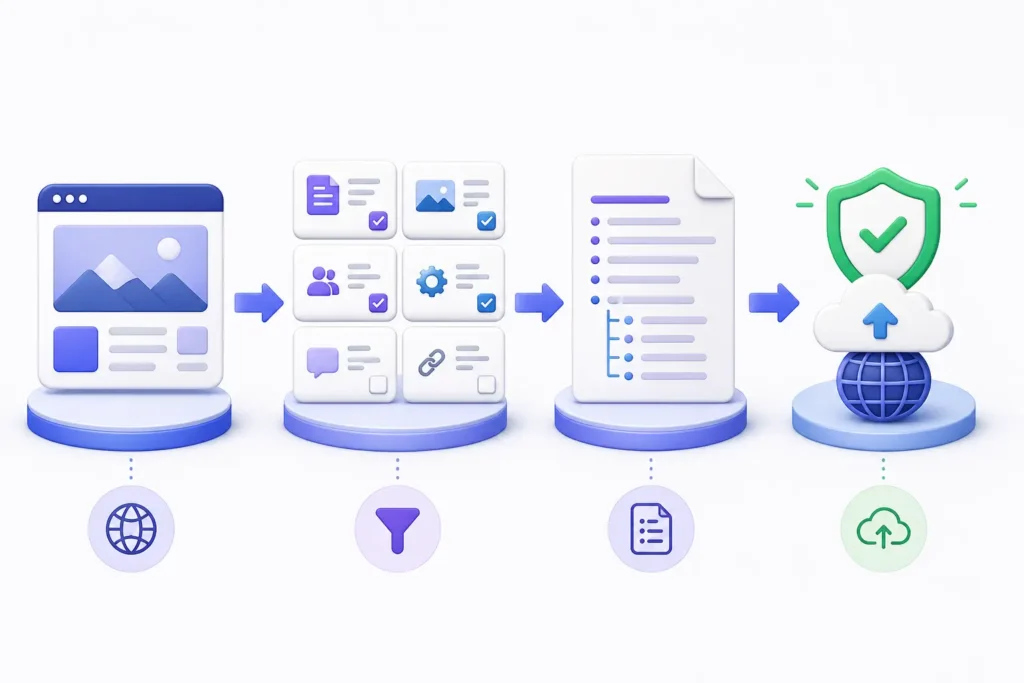
- Enter the canonical website URL. The process normalizes the domain, checks HTTPS, and confirms the root location where the file should be published.
- Select meaningful public pages. Choose the pages that best define the business, services, products, documentation, and evidence. Exclude checkout, login, search results, filtered archives, and customer data.
- Build and review the Markdown. The generator arranges the site name, summary, notes, and grouped links. A person should still verify descriptions, priorities, spelling, and factual accuracy.
- Publish and validate. Upload the plain-text file to the domain root, request
/llms.txt, confirm an HTTP 200 response, and retest every linked URL.
Known limit: A valid file proves only that the file is reachable and follows the selected format. It does not prove that any particular AI crawler fetched it, used it, or will cite the website.
Results explained: pass, warning, fail, and evidence
Pass means the tested condition worked—for example, the file returned 200 and contained a recognizable title. Warning means the file can work but deserves review, such as an unusually large link list or a redirecting URL. Fail means a required condition is missing, malformed, or unreachable. Inconclusive is the honest result when bot protection, timeouts, or network differences prevent a reliable test.
Every result should include evidence: the tested URL, timestamp, response status, detected content, and the exact recommended fix. Evidence makes the report repeatable and helps a developer solve the real problem instead of guessing.
Example: a healthy result and a blocked result
Healthy small-business file
A healthy result loads from the root URL, returns plain text with a successful status, includes one clear site title and summary, and links only to public canonical pages. The links open without authentication, and their descriptions tell a reader why each page matters.
Blocked or problematic file
A problematic result may return 404 because the file was uploaded to the wrong directory, 403 because a firewall challenges automated requests, or 200 with an HTML error page instead of Markdown. Other common problems include redirect loops, relative links, outdated product URLs, and accidental references to staging or private pages.

Do not weaken security to get a pass. Never publish confidential information or disable a firewall globally. Fix the specific route, deployment rule, or public-page selection while keeping authentication and protection in place.
Privacy and data handling
A privacy-conscious generator should request only what it needs: a public URL and the public pages you choose to include. It should not require WordPress administrator credentials, customer records, analytics exports, or private documents merely to create Markdown.
Before using any hosted generator, check whether submitted URLs, generated files, IP addresses, or diagnostic logs are stored; how long they are retained; and whether they are shared with another service. Review the generated text before publishing because anything in /llms.txt is intentionally public.
Troubleshooting invalid URLs, bot protection, and timeouts
- Invalid URL: enter the complete canonical HTTPS address and remove tracking parameters, fragments, or copied dashboard links.
- 404 Not Found: confirm the filename is exactly
llms.txt, check capitalization, and deploy it to the public document root. - 403 Forbidden: inspect CDN and WAF events. Create the narrowest safe rule for the public file rather than turning off bot protection for the whole site.
- Timeout: test from another network, review origin health, and check whether the CDN is waiting on a slow application route.
- HTML instead of text: check rewrites, custom 404 templates, SPA fallbacks, and the
Content-Typereturned by the server. - Inconclusive test: repeat the request, preserve the response headers, and verify the result from the server or CDN logs.
If your hosting platform does not expose the web root, use its documented static-file method or ask support how to serve a fixed file at a root URL. WordPress users may use a carefully reviewed plugin or a server-level file, but the public URL should still resolve predictably.
Manual checks after generating the file
Open https://yourdomain.com/llms.txt in a private browser window. Then check the status and headers from a terminal or an HTTP inspection tool. Confirm that the response body is the intended Markdown—not a login page, security challenge, or branded 404 page.
curl -I https://example.com/llms.txt
curl -L https://example.com/llms.txt
Next, click every listed URL and compare it with the canonical shown in the page source. Review the file whenever services, pricing, documentation, or important URLs change. Also keep your llms.txt and machine-readable website guide practices aligned with normal site maintenance, and understand the separate roles described in llms.txt vs robots.txt vs sitemap.xml.
A simple llms.txt example
# Example Business

> A concise description of the business, audience, location, and primary value.

Important notes about public information and how to use the linked resources.

## Services

- [Primary Service](https://example.com/service/): What the service covers and who it is for

## Guides

- [Helpful Guide](https://example.com/guide/): Original information that answers a common customer question
Keep descriptions factual and specific. Do not add marketing claims you cannot support, stuff keywords into every line, or list hundreds of low-value pages.
Frequently asked questions
Is llms.txt required for Google or AI search?
No. Google says llms.txt does not help or harm visibility or rankings in Google Search. Other tools or agents may choose to use the convention, but support is not universal. Your crawlability, indexable content, internal linking, page quality, and technical health remain more fundamental.
Where should the file be published?
The proposal uses the predictable root location https://example.com/llms.txt. A subpath can be used for a specific documentation area, but the root file is the clearest discovery point for a small business.
How often should I regenerate it?
Update it when important URLs, services, documentation, policies, or brand information change. A monthly check is reasonable for an active site; a stable brochure site may only need review after meaningful edits.
Can the generator include every page automatically?
It can, but it usually should not. llms.txt is most useful as a curated overview. Include pages that explain the business or provide strong supporting information, then keep sitemaps for broad URL discovery.
Does llms.txt replace robots.txt or sitemap.xml?
No. Robots.txt manages crawler access rules, a sitemap lists discoverable URLs, and llms.txt offers a curated Markdown overview for systems that choose to read it. Each has a different job.
Generate, review, and verify your file
Use an llms.txt generator for small business to create a clean first draft, then apply human judgment. Verify the live file, protect private data, retain evidence for warnings and failures, and measure outcomes separately. The best result is not merely a green validator—it is an accurate, maintainable guide that complements a technically healthy website.