

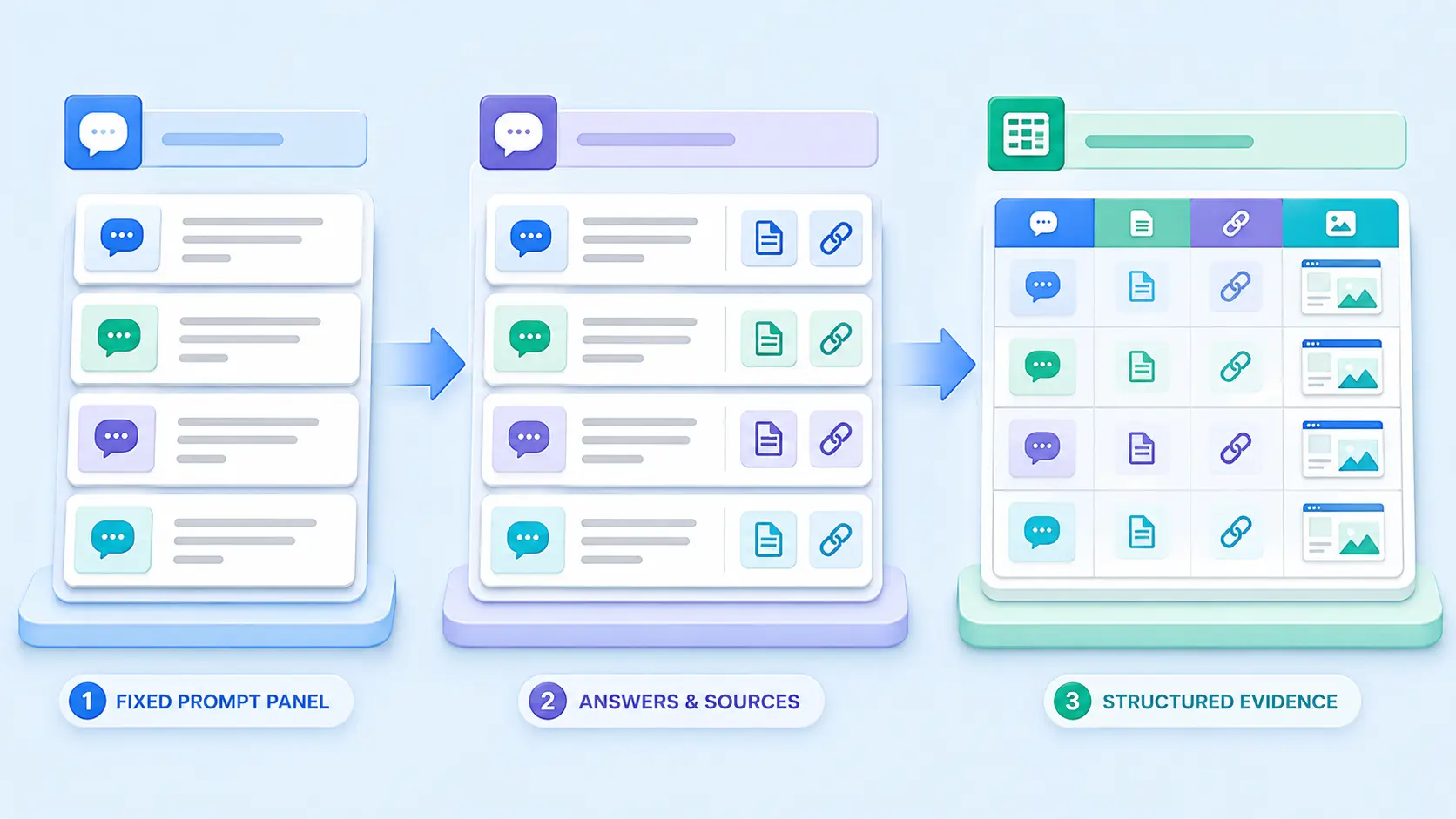
An AI citation tracking spreadsheet template gives you a consistent way to record where your brand appears in AI-generated answers, which page is cited, whether the citation is accurate, and how results change over time. The goal is not to turn one prompt into a vanity score. It is to build an auditable record that separates mentions, citations, clicks, and repeatability.
Template outcome: Create one shared evidence log for ChatGPT search, Google AI features, and other answer platforms. Each row preserves the prompt, testing conditions, cited URL, proof, and interpretation so your monthly report can be checked later.
Use this guide if you manage SEO, content, PR, or client reporting. It explains every field, shows a realistic sample row, and provides a copy-ready header that works in Microsoft Excel, Google Sheets, Apple Numbers, or any CSV-compatible tool.
What is included in the AI citation tracking spreadsheet template
A useful tracker needs more than “brand found: yes or no.” AI answers vary by wording, date, location, account context, and product experience. Your spreadsheet therefore needs enough context to reproduce the test and enough outcome fields to turn observations into decisions.
| Section | Recommended fields | Why it matters |
|---|---|---|
| Test identity | Run ID, prompt ID, prompt version, platform, experience or model, date, time, tester | Lets another person understand exactly what was tested. |
| Query context | Prompt text, topic cluster, intent, market, language, location, account state, web search on/off | Prevents unlike tests from being averaged together. |
| Visibility result | Brand mentioned, target page cited, citation position, cited URL, other company URLs | Separates a mention from a link to the correct page. |
| Quality review | Claim supported, citation accuracy, sentiment, answer relevance, notes | Shows whether visibility is useful and factually safe. |
| Evidence | Screenshot or recording link, answer archive, source-panel capture | Makes the result auditable after the live answer changes. |
| Action | Issue type, priority, owner, recommended fix, retest date, status | Converts measurement into accountable work. |
Important distinction: A mention is not automatically a citation. A citation is not automatically a visit. Record brand mentions, linked source URLs, referral traffic, and conversions in separate columns.
Field guide: define every input, metric, and status label
Experiment and prompt fields
Give each prompt a permanent ID such as P-014, then store its wording in a prompt-library sheet. If you change even one meaningful phrase, create a new version instead of silently overwriting the old prompt. Record the platform name, product experience, test date, market, language, whether live web search was active, and any signed-in or personalization state you can identify.
- Run ID: a unique value for one observed answer, such as
2026-08-06-P014-R02. - Prompt ID and version: the stable question and its controlled wording version.
- Test conditions: platform, experience, date, country, language, account state, and web access.
- Target entity: the company, product, person, or topic you expect the answer to identify.
- Target URL: the canonical page that would best support the prompt.
Outcome and evidence fields
Use controlled labels rather than free-form descriptions wherever possible. For example, set “Brand mentioned” to Yes, No, or Ambiguous; “Target cited” to Yes or No; and “Citation accuracy” to Accurate, Partial, Incorrect, or Not applicable. Keep a notes column for nuance, but do not make the notes your only measurement.
- Brand mentioned: whether the exact brand or an unmistakable variant appears.
- Target cited: whether the answer links to your domain or target page as a supporting source.
- Cited URL: copy the final canonical URL, not only the visible anchor text.
- Citation position: first, second, third, or later in the visible source set.
- Competitor citations: domains or pages that appear for the same prompt.
- Accuracy: whether the cited passage actually supports the nearby claim.
- Evidence link: the screenshot, recording, or archived output for that run.
Setup instructions: prompts, pages, baseline, and cadence
- Choose one business question set. Start with 10–20 prompts covering definitions, comparisons, problem solving, product discovery, and follow-up questions.
- Map every prompt to one preferred page. This makes a “wrong page cited” result visible instead of counting every domain link as success.
- Create a baseline before changing content. Run the same prompt panel under documented conditions and save source-panel evidence.
- Set a cadence that matches the decision. Monthly testing suits active content programs; quarterly testing may be enough for a stable topic.
- Repeat important prompts. Report “cited in 3 of 10 runs,” not simply “cited,” because generated answers can vary.
- Keep analytics separate but connected. Add referral sessions, engaged visits, leads, or conversions only when the source and date window are defined.
OpenAI says publishers can identify ChatGPT search referrals because outbound URLs include utm_source=chatgpt.com. That makes referral sessions a useful companion metric, but it still should not be merged with manual citation counts. Google’s current guidance likewise keeps conventional search eligibility central to AI features, while its newer generative AI performance reporting provides platform-specific visibility data where available.
Worked example: complete one row from input to interpretation
The row below is illustrative, not a claimed live result. It shows how to document an observation without hiding variation or implying that a single answer proves durable visibility.
| Field | Illustrative value |
|---|---|
| Run ID | 2026-08-06-P014-R02 |
| Prompt | What should a small business check before an AI visibility audit? |
| Platform and conditions | AI answer platform; web search active; English; Pakistan; signed-in state recorded |
| Target URL | /ai-visibility-audit/ |
| Brand mentioned | Yes |
| Target cited | Yes |
| Cited URL | https://visiblepilot.com/ai-visibility-audit/ |
| Citation accuracy | Partial — correct page, but the cited passage lacks the testing limitation |
| Competitor citations | Three other domains recorded in separate columns |
| Evidence | Screenshot ID S-2026-08-06-P014-R02 |
| Action | Add a direct limitations paragraph; retest after the page is refreshed |
Interpretation: This row is not a win/loss verdict. It identifies a specific content improvement and preserves the evidence needed to test whether the change produces a more accurate, repeatable citation.
Reporting workflow: turn observations into decisions
Build summary metrics only after the raw rows are clean. Keep denominators visible and calculate rates within comparable groups—for example, the same prompt panel, market, platform experience, and reporting period.
| Metric | Calculation | Decision it supports |
|---|---|---|
| Mention rate | Runs mentioning the target ÷ eligible runs × 100 | Whether the entity appears in relevant answers. |
| Citation rate | Runs citing the target domain or page ÷ eligible runs × 100 | Whether mentions are supported by visible source links. |
| Correct-page rate | Runs citing the preferred target URL ÷ runs citing the domain × 100 | Whether internal targeting and page fit are clear. |
| Accurate-citation rate | Accurate citation rows ÷ reviewed citation rows × 100 | Whether the cited evidence supports the generated claim. |
| Repeatability | Prompts cited in multiple runs ÷ prompts tested repeatedly × 100 | Whether the outcome survives repeated sampling. |
| Referral conversion rate | Conversions from identified AI referrals ÷ AI referral sessions × 100 | Whether linked visibility creates business value. |
Use the summary to choose actions. A low mention rate may indicate weak topic relevance or entity recognition. A strong mention rate with a weak citation rate calls for better source-worthy pages and evidence. A high citation rate with the wrong URL suggests cannibalization, vague internal linking, or an unsuitable canonical target. Accurate citations with no referral activity may still build awareness, but the business impact should be reported separately.
Avoid inconsistent samples, duplicate prompts, and misleading averages
- Do not compare a five-prompt baseline with a later fifty-prompt test as if the samples were identical.
- Do not count paraphrased duplicates as independent market demand; group prompts by intent and keep a master prompt library.
- Do not mix product experiences, countries, languages, or search-on/search-off results without a segment column.
- Do not replace “No citation” with a blank cell. A blank should mean missing data, not failure.
- Do not count the same cited URL twice within one answer unless your method explicitly measures placements.
- Do not publish an average that hides the denominator, repeat count, or prompt selection rule.
- Do not claim causation from a before-and-after change without considering recrawling, model updates, competitors, and ordinary answer variance.
Common mistake: Combining unlike prompts or proprietary vendor scores into one number can create a smooth chart that says very little. Preserve the raw evidence and publish the sampling rule beside every headline metric.
Versioning and monthly or quarterly comparison method
Create a read-only snapshot at the end of every reporting period. Name it with a sortable convention such as AI-Citations_2026-08_v1. Keep the raw-results sheet unchanged, update the prompt library through explicit versions, and place calculated summaries on a separate report sheet. When a platform changes its interface or introduces a new reporting view, document the change instead of forcing it into an old definition.
- Freeze the tested prompt IDs and versions for the period.
- Store the exact start and end dates, platform notes, and tester instructions.
- Archive evidence files using the run ID so each row has a matching capture.
- Record page changes, redirects, canonical updates, and publication dates in a change log.
- Compare matched prompt cohorts first; show new or retired prompts separately.
- Use monthly views for optimization work and quarterly views for strategic trends.

Download and use the free template
Copy the tab-separated header below and paste it into cell A1 of a blank Excel or Google Sheets workbook. Each label will fall into its own column. Add a second sheet named Prompt Library and a third named Monthly Summary. Save the workbook as .xlsx if you want formulas, validation lists, and charts to remain portable.
Run ID Prompt ID Prompt Version Prompt Text Topic Cluster Intent Platform Experience or Model Test Date Test Time Country Language Account State Web Search Active Target Entity Target URL Brand Mentioned Target Cited Cited URL Citation Position Citation Accuracy Answer Relevance Sentiment Competitor 1 Competitor 2 Competitor 3 Evidence Link Issue Type Priority Owner Recommended Action Retest Date Status NotesFor a deeper measurement plan, connect this tracker to the AI Visibility Audit and Measurement Framework. Then review AI visibility metrics that actually matter before adding more dashboard scores.
Frequently asked questions
Does the template work with Excel and Google Sheets?
Yes. The header is tab-separated, so it can be pasted directly into Excel, Google Sheets, Apple Numbers, or most spreadsheet applications. After pasting, add validation lists for Yes/No fields and protect formula columns from accidental edits.
Can I customize the fields for my agency or website?
Yes. Keep the core test identity, conditions, outcome, evidence, and action fields. Add client, campaign, product line, content owner, or conversion columns only when they support a decision. Avoid deleting the prompt version, denominator, or evidence fields because those protect comparability.
What private information should I avoid storing?
Do not store passwords, private customer data, full account identifiers, confidential prompts, or personally identifiable information in a shared tracking sheet. Use internal evidence IDs and access-controlled storage for screenshots that contain sensitive material.
How often should the tracker be updated?
Add a row immediately after each test so the conditions are not reconstructed from memory. Review active programs monthly and stable topic sets quarterly. Retest sooner after a major technical fix, migration, URL change, or important content revision.
Can this spreadsheet prove that an optimization caused a citation?
No. It can improve measurement discipline and show patterns, but AI outputs and search systems change. Use matched prompts, repeated runs, documented page changes, and cautious language. Treat causal claims as hypotheses unless you have a controlled test.
Next step: build an evidence-led citation baseline
Start with ten important prompts and three representative URLs. Create the baseline before editing the pages, record every answer under the same rules, and keep the raw rows. Your AI citation tracking spreadsheet template becomes valuable when it helps you decide what to fix, what to retest, and which visibility changes are repeatable enough to report.
Sources: OpenAI Publishers and Developers FAQ; OpenAI crawler documentation; Google’s guide to optimizing for generative AI features; Google Search Console generative AI performance report.