

AI crawler access for membership websites is not a choice between exposing everything and blocking everything. The safer goal is selective discoverability: make public value, expertise and page purpose easy to crawl while keeping paid lessons, personal data and account features behind authentication.
This guide shows how to test that boundary without weakening the paywall. You will need a short list of representative URLs, access to HTTP headers or server logs, your robots.txt rules, and the ability to review CDN or web application firewall events.
The practical rule
Let crawlers understand what the membership offers; do not give them access that an anonymous visitor should not have. A healthy result may be 200 OK on public and preview pages, a clear login response on protected pages, and no accidental 403 or challenge on content you intended to promote.
What AI crawler access for membership websites means
Membership websites usually contain several access layers. Marketing pages, pricing, public articles and selected previews can build search visibility. Login, billing, profiles, private discussions, downloads and full courses should remain protected. The audit is therefore a policy test as much as a technical test.
OpenAI documents separate agents for search discovery, model training and user-initiated visits. That distinction matters: allowing a search crawler is not automatically the same decision as allowing training. Anthropic also documents robots.txt controls for its bots. Configure named agents deliberately instead of relying on one vague “AI bot” rule.
Step 1 — Establish a clean baseline
Choose URLs that represent every important template, not merely the homepage. Test at least one URL from each access tier and record the expected anonymous behavior before making changes.
- Public: homepage, pricing, category pages, public blog posts and instructor profiles.
- Preview: sample lesson, course outline, resource summary or limited article excerpt.
- Authentication: login, registration, password reset and checkout.
- Protected: member dashboard, full lessons, account pages, private community threads and downloads.
For each URL, record the timestamp, requested user agent, status code, redirect chain, robots directive, canonical URL, content length and whether meaningful text appears in the initial HTML. This baseline prevents a later “fix” from being judged by memory.

Step 2 — Audit pages that answer buying questions
A crawler does not need access to the private library to understand the business. It needs public pages that clearly answer who the membership serves, what outcomes it supports, what is included, who created it, how pricing works and what makes the material credible.
Inspect course landing pages, feature comparisons, curriculum summaries, instructor bios, FAQs, policies, public case studies and preview lessons. Thin public shells with every useful detail loaded only after login create a discovery gap even when robots.txt is permissive.
High-impact opportunity
Publish a useful public summary for every major course, program or resource collection. Include the audience, prerequisites, learning outcomes, author, update date and a concise curriculum. The summary should stand on its own; it should not reproduce the paid material.
Step 3 — Separate access, rendering and content failures
When a public page is missing from AI-driven discovery, first identify the failure class. An access failure means the request cannot retrieve the page. A rendering failure means the response arrives but the important meaning depends on scripts or authenticated API calls. A content failure means the page is accessible yet too vague, duplicative or unsupported to be useful.
- Access checks: robots.txt, meta robots, X-Robots-Tag, status code, redirect target, login middleware, rate limits and bot verification.
- Rendering checks: initial HTML, delayed JavaScript, consent overlays, client-side routing and content fetched from protected endpoints.
- Content checks: unique title and heading, visible summary, entity details, authorship, dates, evidence, internal links and canonical consistency.
A 403 from a WAF on a public course page is an access failure. A 200 response containing only an empty app shell is a rendering failure. A fully rendered page that says little beyond “join now” is a content failure. Each requires a different remedy.
Step 4 — Apply the smallest safe fix
Do not whitelist an entire crawler across the member area merely because a public page was blocked. Narrow the change to the affected path, rule or delivery layer. Typical safe fixes include removing an unintended disallow from a public directory, exempting verified crawlers from a challenge on public pages, server-rendering the public summary, or correcting a canonical that points to the login page.
Keep authentication as the authority for protected content. Robots.txt is a crawl preference, not a security control. Sensitive URLs still require server-side authorization, and an anonymous request should never receive private content simply because it uses a crawler user agent.
Security warning
Never test visibility by weakening authorization in production. Do not reveal member emails, progress, purchases, private posts or paid files. If protected content appears to an unauthenticated crawler request, treat it as a security incident—not an SEO opportunity.
Step 5 — Retest with identical inputs
Repeat the same requests after the change. Use the same URLs, user agents, region, headers and test window where possible. Define the pass condition before reading the result so that a different response is not automatically mistaken for an improvement.
- Public and approved preview pages return 200 without a challenge loop.
- Meaningful public copy appears in the response that an anonymous crawler receives.
- Canonical and indexing directives match the intended public URL.
- Protected URLs still require valid authentication and reveal no private content.
- Server or CDN logs show the request reaching the expected layer.
- Relevant pages remain linked from crawlable public navigation or sitemaps.
Worked example: a course membership blocked at the edge
Imagine a training membership with public course pages, one free lesson per course and a protected lesson library. The baseline shows 200 responses for normal browser requests, but a verified search crawler receives 403 on every /courses/ URL. The login and dashboard correctly return authentication responses.
The robots file allows the public course directory, so the team checks the CDN. A generic bot rule is challenging unfamiliar automated traffic before WordPress runs. Instead of disabling bot protection site-wide, the team creates a narrow exception for verified search crawlers on /courses/ and /preview/. The member, account and download paths remain outside the exception.
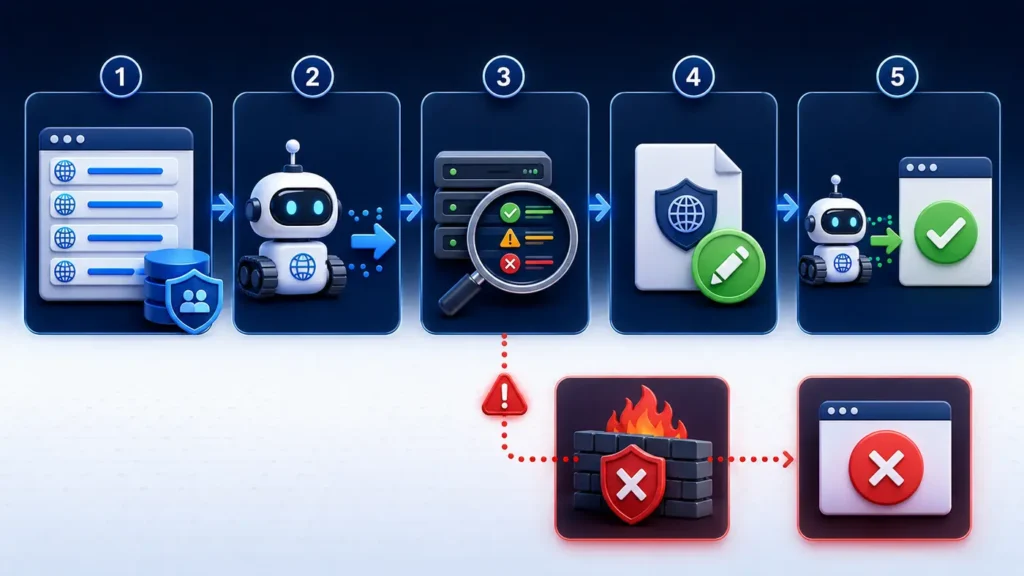
The retest returns 200 for public course pages and previews, meaningful HTML is present, and protected lessons still redirect to login. The team records the rule ID, test time, response headers and screenshots. That evidence proves improved public access without claiming that citations are guaranteed.
Access matrix for membership websites
- Public marketing and course summaries: normally crawlable and indexable when useful and accurate.
- Free preview lessons: crawlable if intentionally public; use a self-referencing canonical and clear internal links.
- Metered or paywalled articles: decide whether indexing is desired and use appropriate paywall markup for supported search systems.
- Login, dashboard and account pages: authenticate, minimize indexing signals and keep private data server-side.
- Paid downloads and API endpoints: require authorization; do not rely on obscurity, user-agent checks or robots.txt.
Evidence and screenshots to keep
Capture the robots rules that applied, the response headers, the visible or raw HTML, the CDN/WAF event, the authorization result for protected paths and the final retest. Store the test account separately from production member data. Good evidence makes future regressions easier to diagnose and gives product, security and marketing teams a shared record.
Common interpretation mistake
The most common mistake is copying a generic AI SEO checklist and opening too much—or blocking every AI-related agent without separating search, training and user-requested access. A membership business has a unique inventory and risk model. Start with its page types, contractual promises and desired public footprint.
Another mistake is treating a successful fetch as proof of visibility. Access is only the first gate. A platform may still decline to index, mention or cite a page because of relevance, quality, authority, freshness or product-specific systems. Measure access and citation outcomes separately.
Frequently asked questions
Should AI crawlers access paid membership content?
Usually no. Paid lessons and private member information should remain protected by server-side authentication. Publish strong public summaries and selected previews if you want the subject matter to be discoverable.
Is robots.txt enough to protect member content?
No. Robots.txt communicates crawling preferences but does not enforce authorization. Protect sensitive content with authentication and permission checks at the server or application layer.
Can I allow AI search while blocking model training?
Some operators publish separate user agents for different purposes. OpenAI, for example, documents OAI-SearchBot separately from GPTBot. Review current operator documentation and express each policy explicitly in robots.txt.
Why does a crawler receive 403 when visitors can view the page?
A CDN, WAF, security plugin, rate limiter or bot-management rule may challenge automated traffic before the page reaches your application. Check edge logs and verify crawler identity before making the narrowest possible exception.
Does crawler access guarantee an AI citation?
No. It establishes technical eligibility only. Citation also depends on whether the page is relevant, understandable, credible, current and useful for the specific query.
Authoritative guidance
- OpenAI crawler documentation
- Anthropic bot and robots.txt guidance
- Google guidance for subscription and paywalled content
- Google flexible sampling guidance
Next step
Use the AI Search Readiness by Website Type guide to place this audit in a wider technical plan, then review AI search readiness for WordPress websites for the next platform-specific checklist. Get the AI Search Readiness checklist and document your public, preview and protected URL tiers before changing crawler rules.