
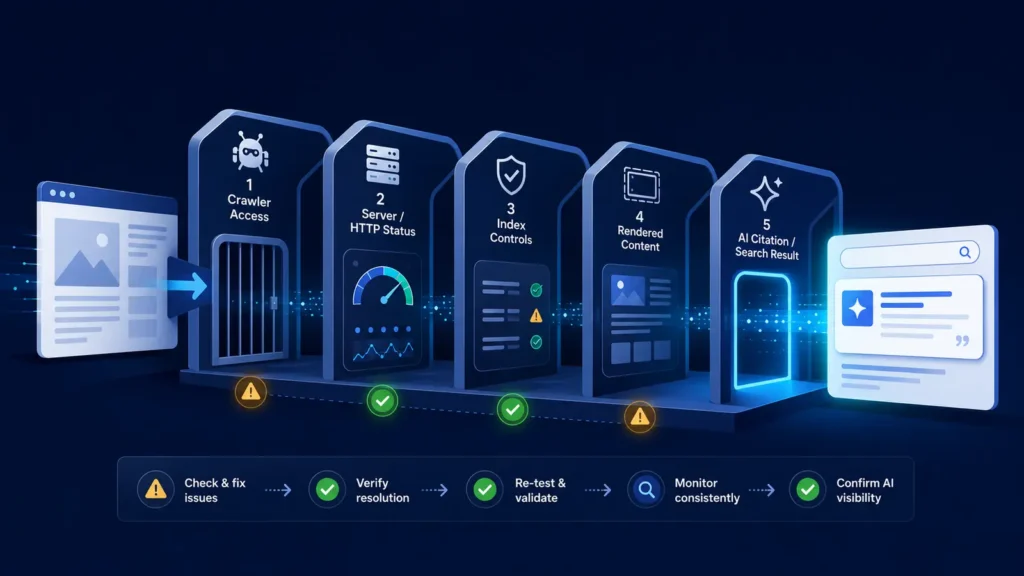
An AI indexing problems troubleshooting checklist should answer one question at a time: can a platform discover, fetch, interpret and retrieve this page? If your website is missing from ChatGPT, Perplexity, Gemini or another AI-assisted search experience, do not jump straight to rewriting content. Start with access and delivery, preserve evidence, and move forward only after each layer passes.
This checklist is for site owners, marketers and technical SEO teams who need a repeatable diagnosis. It prevents the most expensive mistake in AI visibility work: changing many things at once and then guessing which change mattered. Use one representative commercial page, one article and the homepage. Record the same evidence for all three.
Quick answer: an AI platform not mentioning your site does not prove that your site is absent from a single shared “AI index.” Platforms use different crawlers, retrieval systems, conventional search signals and answer-generation rules. A page may be crawlable yet not selected for a prompt; it may also be indexed by Google but blocked from an AI search crawler.
Before you start: pages, access, tools and baseline evidence
Choose three stable URLs rather than testing the whole site. For each URL, record the canonical URL, HTTP status, robots.txt result, robots meta directives, X-Robots-Tag headers, rendered main text, internal links, sitemap presence and the date of your platform tests. Save screenshots or response headers so another person can reproduce the check.
- Representative URLs: homepage, high-value service or product page, and one useful knowledge article.
- Access tools: a browser, command-line HTTP client or header checker, robots.txt tester, server/CDN logs and Google Search Console where available.
- Platform evidence: fixed prompts tested in fresh sessions, exact answer text, cited URLs, location or language settings and test time.
- Change log: what changed, when it went live and the earliest reasonable retest date.
Do not use private or sensitive pages as test URLs. If content should not be public, protect it with authentication. Robots.txt is crawler guidance, not an access-control system.
Check 1: discovery and crawler access
Open /robots.txt on the domain and inspect the rules for the crawler you care about. OpenAI states that OAI-SearchBot is used to surface websites in ChatGPT search results and recommends allowing both the user agent and its published IP ranges. Perplexity similarly documents PerplexityBot for surfacing and linking websites in its results. These are purpose-specific controls; training crawlers and user-triggered fetchers may use different names and policies.
A clean-looking robots.txt file is not enough. Confirm that the file returns a normal HTTP response, that the tested URL is not covered by a broader disallow rule, and that CDN or web application firewall rules do not challenge the crawler. Verify genuine crawler traffic against each provider’s published IP information where available; a user-agent string can be spoofed.
- Fetch the exact URL with a normal browser user agent and the relevant documented crawler user agent.
- Check status, redirects, response time and final destination.
- Review CDN/WAF security events for blocks, challenges, rate limits or bot-score rules.
- Confirm the URL is linked internally and included in the intended XML sitemap.
- Record pass, warning or fail; do not rewrite the page until access failures are resolved.
Check 2: technical delivery, rendering and index controls
The target page should normally return 200 OK. Repeated 403, 429 or 5xx responses create an access problem; redirect chains and soft 404s create ambiguity. Inspect the final HTML for noindex, conflicting canonical tags and an X-Robots-Tag header. Google’s documentation makes an important distinction: robots.txt controls crawling, while noindex controls indexing when the crawler can access and see that directive.
Render the page as a crawler would receive it. If the meaningful answer, product facts or entity details appear only after a click, login, consent interaction or failed JavaScript request, retrieval systems may receive an incomplete page. Primary content should be present in stable HTML or reliably rendered without user interaction.
| Test | Pass | Warning / fail |
|---|---|---|
| HTTP delivery | 200 response; stable final URL | 403, 429, 5xx, loop, soft 404 |
| Index controls | Intended canonical; no accidental noindex | Conflicting canonical, meta robots or X-Robots-Tag |
| Rendering | Main answer and facts visible | Empty shell, interaction-only content, JS error |
| Resources | Required CSS/JS accessible | Blocked assets make content hard to interpret |
Fix priority: access and HTTP failures are critical; accidental index controls are critical; rendering gaps are important. Cosmetic structured-data improvements come later because they cannot compensate for a page that cannot be fetched.
Check 3: content clarity, entities and source signals
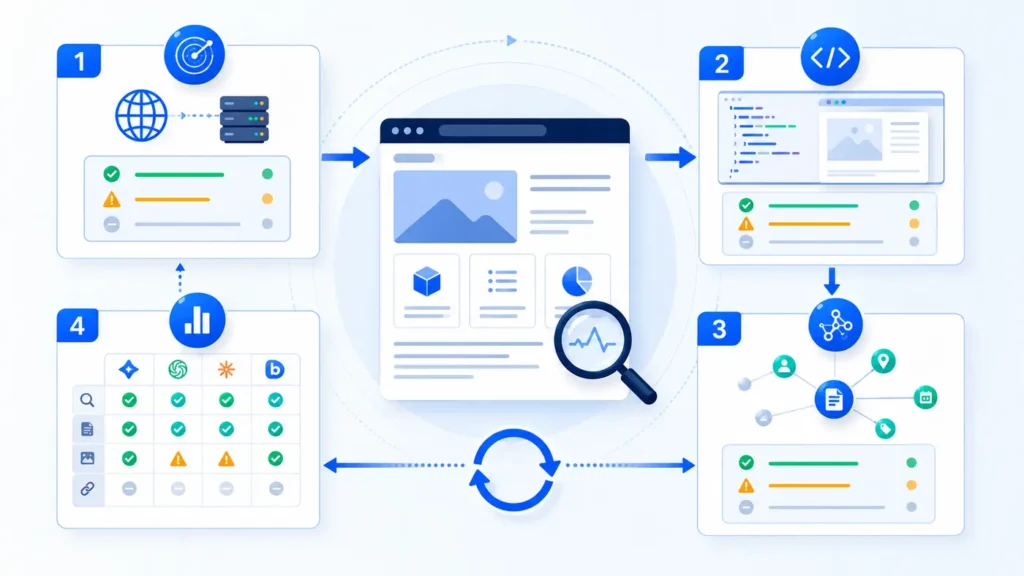
Once delivery passes, inspect whether the page can be understood without surrounding brand knowledge. The title, main heading and opening paragraph should agree on the page’s purpose. Name the organization, product, location or subject consistently. Explain claims with dates, methods and sources where appropriate. Link to the relevant author, about, policy, contact and supporting pages so the entity is not isolated.
Useful content is not the same as keyword repetition. A strong page resolves a distinct question, states boundaries, includes verifiable facts and is easy to quote accurately. Add original examples, comparisons, screenshots or measurements when they genuinely help. Do not manufacture statistics, reviews or “AI citation” results.
- Topic clarity: one primary question is answered early and supported in depth.
- Entity clarity: names, relationships, locations and ownership are explicit and consistent.
- Evidence: important claims identify a source, method, date or limitation.
- Page relationships: descriptive internal links connect the page to its pillar and adjacent troubleshooting content.
- Freshness: dated facts are reviewed and materially changed pages show an updated date.
Structured data is supporting evidence, not a visibility switch. Use schema that matches visible content and the actual page type. Do not add misleading markup or expect it to force an AI platform to cite the page.
Check 4: platform test and pass/fail recording method
Test retrieval only after the technical checks pass. Use a fixed prompt set that represents brand, category and problem intent. Repeat each prompt in fresh sessions, note whether the site is found, mentioned or cited, and save every cited URL. Run the same prompts on multiple dates because answers and source selection can vary.
| Outcome | Meaning | Next action |
|---|---|---|
| Found and cited | The tested answer includes a link to your page | Verify accuracy; monitor repeatability |
| Mentioned, not cited | Brand appears but your URL is absent | Improve source clarity and test narrower prompts |
| Another page cited | Domain is discoverable; URL selection differs | Strengthen internal linking and page-topic fit |
| Not found | No evidence in this test | Return to access, indexing and entity checks |
| Inconsistent | Results change across sessions | Increase sample size; avoid a binary conclusion |
A practical pass condition is not “one prompt cited us once.” Define it before testing—for example, all three URLs are fetchable, contain no accidental index block, render their primary content, and a fixed prompt set is repeated across three dates with results recorded. Platform citation remains an observed outcome, not a guarantee.
Prioritization table: critical, important and improvement items
| Priority | Examples | Action |
|---|---|---|
| Critical | Blocked crawler, 403/429/5xx, accidental noindex, broken canonical | Fix first and retest the exact URL |
| Important | Thin rendered HTML, weak discovery links, unclear ownership or entity facts | Repair after access passes |
| Improvement | Better summaries, evidence tables, schema, update notes | Apply selectively and measure |
| Monitor | Answer volatility, delayed recrawl, prompt-dependent source choice | Repeat tests on a defined schedule |
Evidence and screenshots to include
A defensible diagnosis should include the robots.txt rules in effect, response headers, redirect destination, rendered page view, canonical and robots directives, sitemap or internal-link evidence, relevant crawler-log rows, and platform answers with cited URLs. Remove personal data and security-sensitive information before sharing logs.
Keep raw evidence separate from interpretation. “The server returned 403 to a verified crawler request at 10:42 UTC” is evidence. “The platform ignored our brand” is an interpretation. This separation helps developers reproduce failures and prevents marketing teams from overclaiming causation.
Common interpretation mistake
The most common mistake is treating a single AI answer as a stable index. A missing citation may reflect prompt wording, location, freshness, retrieval ranking, answer composition or platform policy—not only crawling. Likewise, a conventional Google ranking does not prove that every AI search crawler can access the page. Diagnose the pipeline in order and compare like-for-like tests.
AI indexing problems troubleshooting checklist: quick recap
- Select representative URLs and save a baseline.
- Verify documented crawler access, IP authenticity and CDN/WAF behavior.
- Confirm 200 delivery, intended redirects, canonical and index directives.
- Ensure primary content renders without user interaction.
- Strengthen topic, entity, source and internal-link clarity.
- Retest fixed prompts in fresh sessions and record found, mentioned and cited separately.
- Change one layer at a time, then preserve the before-and-after evidence.
Frequently asked questions
Does Google indexing guarantee visibility in ChatGPT or Perplexity?
No. Google indexing is useful evidence that a page can participate in Google Search, but ChatGPT and Perplexity publish their own search crawler guidance and may use different retrieval and answer-selection processes. Test each target platform independently.
Should I allow every AI crawler in robots.txt?
Not automatically. Decide by crawler purpose, your publishing policy and risk requirements. Allow only the access that supports your goals, and use each provider’s current documentation. Never expose private information simply to improve visibility.
How quickly should I retest after a fix?
Retest HTTP delivery immediately, because the server response should change at once. Recheck logs as new crawler visits occur. Platform discovery or citations may take longer and have no guaranteed schedule, so use dated repeat tests rather than promising a fixed number of days.
Can schema markup fix an AI indexing problem?
Schema can clarify facts when it accurately matches visible content, but it cannot repair blocked crawling, server errors, accidental noindex directives or missing main content. Treat it as an improvement after critical delivery issues pass.
What is the best proof that the problem is fixed?
Use layered proof: the target crawler is allowed, the URL returns the intended content, the rendered page exposes the main facts, logs show successful access where available, and repeated platform tests are recorded. A single citation is encouraging, but it is not a permanent guarantee.
Next step
Use this checklist on the homepage, one commercial page and one article, then compare failures by layer. For the broader context, read Why AI Search Engines Cannot Find Your Website. To see a platform comparison, continue with ChatGPT vs Perplexity website discovery.
Want a cleaner baseline? Get the Visible Pilot AI Search Readiness checklist and record crawler access, rendered content, entity clarity and platform evidence in one place.