

If ChatGPT can open your homepage but not inner pages, do not assume ChatGPT has indexed the whole site. The homepage may be reached through a user-triggered visit, a navigational result, or an existing link while deeper URLs remain blocked, undiscovered, redirected, or difficult to interpret. The fastest route to a fix is to test the same inner-page URLs at each technical layer and record where the evidence changes.
Fast answer: compare the homepage with three representative inner pages. Check robots.txt for OAI-SearchBot, final HTTP status, redirects, CDN/WAF events, canonical and noindex directives, rendered HTML, internal links, and server logs. Then repeat a fixed set of ChatGPT search prompts. A page that returns 200 and is crawlable is technically accessible; it is not automatically discoverable or guaranteed a citation.
Quick diagnosis: ChatGPT can open homepage but not inner pages
This symptom usually comes from a difference between the homepage template and deeper templates, not a mysterious site-wide penalty. Start by matching what you observe to the most likely failure.
| Observed symptom | Likely cause | First evidence to inspect |
|---|---|---|
| Homepage opens; every inner URL fails | Path-based robots, WAF, authentication, or routing rule | robots.txt, edge firewall events, final status |
| Some folders fail | Directory-specific disallow, geo rule, bot protection, or application middleware | Affected path patterns and response headers |
| URL opens directly but is never cited | Discovery, relevance, or citation-selection gap | Internal links, sitemap, fixed prompt matrix |
| Page shell opens without useful text | Client-side rendering or blocked assets/API | Rendered HTML and network dependencies |
| Only a copied bot user-agent fails | Security rule reacts to the string; test is not authentic crawler proof | WAF rule ID and source-IP verification |
Important distinction: OpenAI says OAI-SearchBot is used for ChatGPT search discovery. ChatGPT-User is used for certain user-triggered visits and is not the automatic search crawler. A successful ChatGPT-User visit does not prove that OAI-SearchBot can crawl the same inner page.
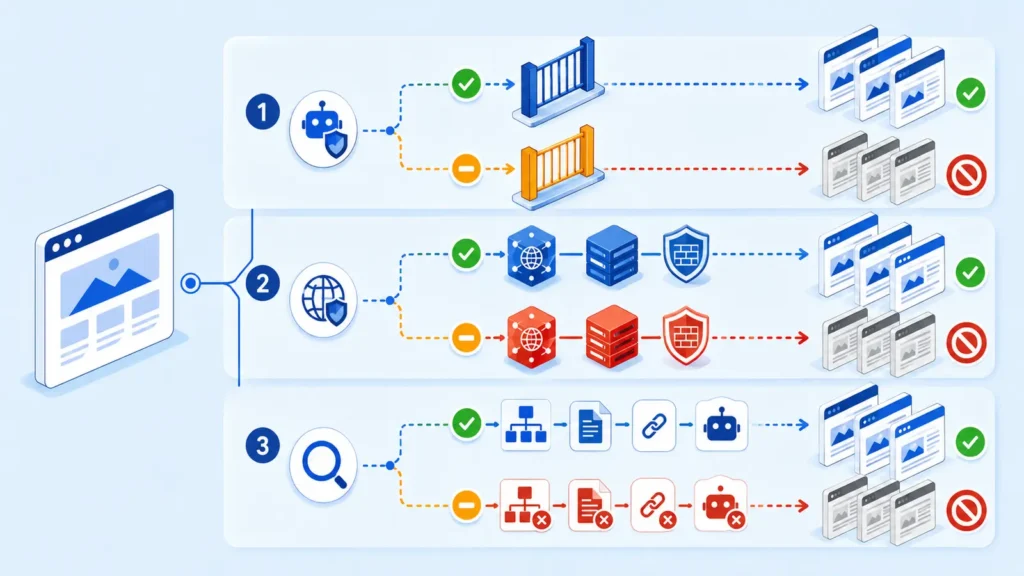
Symptom map: access, rendering, discovery, or citation?
1. Access failure
An access failure occurs before page content can be evaluated. The inner URL may return 401, 403, 404, 429, 5xx, a challenge page, or an endless redirect. Because security systems often treat the root path differently from deeper paths, the homepage can remain open while articles, product pages, or application routes are blocked.
2. Rendering failure
The server may return 200 but deliver only an empty application shell, cookie wall, consent overlay, or JavaScript placeholder. If the meaningful heading, answer and internal links appear only after a blocked script or API call, the fetch technically succeeds while the content remains unusable.
3. Discovery gap
The page is accessible but poorly connected. Orphan pages, weak internal anchors, absent sitemap entries, unstable canonical URLs, pagination traps and parameter duplicates can make inner content difficult to discover consistently. A homepage link alone may not establish a clear path to every useful page.
4. Citation-selection gap
The page is reachable and discoverable, yet ChatGPT does not use it for the tested question. That outcome is not proof of blocking. Search answers vary with the query, available sources, freshness and answer composition. Eligibility removes barriers; it never guarantees selection.
Test 1: reproduce the problem on representative URLs
Choose four URLs: the homepage, a key service or product page, a recently published article, and an older deep page. Avoid testing only one convenient URL. Record the same fields for every page so template and directory differences become visible.
- Browser baseline: open each URL in a private window and record the final URL, status and visible main content.
- Normal HTTP request: check the redirect chain, response headers, content type and HTML body.
- Controlled crawler-identity request: repeat the request with the published OAI-SearchBot user-agent to see whether infrastructure changes its response.
- Rendered-content check: confirm the page title, H1, primary answer, author or organization, canonical and internal links exist in the delivered content.
- Trusted logs: inspect CDN and origin events for real requests and rule decisions.
curl -I -L https://example.com/deep-page/

curl -I -L -A "OAI-SearchBot/1.4; +https://openai.com/searchbot" \
  https://example.com/deep-page/
Do not treat the user-agent test as authentication. Anyone can copy a crawler name. It is useful for revealing a rule triggered by the string, but genuine OpenAI traffic should be checked against OpenAI’s current published IP ranges using the source IP captured by your trusted edge or origin logs.
Test 2: repeat a fixed ChatGPT prompt set
Technical requests and ChatGPT answers measure different things. After the URL checks, run the same small prompt set in fresh sessions and keep the wording unchanged. Test a navigational prompt for the brand, a category prompt, a narrow question answered by the inner page, and a direct request to open the exact URL.
| Result state | Meaning | Next action |
|---|---|---|
| Homepage found; inner page not found | Possible discovery or query-fit gap | Check internal links, sitemap and exact topic coverage |
| Exact inner URL opens | User-triggered retrieval works in that test | Still verify OAI-SearchBot and discovery separately |
| Brand mentioned without link | Entity may be recognized, but no citation was selected | Improve source relevance and evidence |
| Inner page cited | Selected for that prompt and session | Repeat later; do not call one answer permanent |
| Answer varies across sessions | Normal output or source-selection variation | Measure a fixed sample over time |
Capture the date, prompt, session state, answer, cited URLs and whether browsing/search was active. A single favorable or unfavorable answer is not a stable index report.
Root-cause checks
Robots directives that differ by path
Read the complete robots.txt file and evaluate the most specific matching group. Look for directory rules such as Disallow: /blog/, /resources/, /products/ or wildcard patterns that do not affect /. OpenAI’s crawler controls are independent: allowing GPTBot for training does not automatically allow OAI-SearchBot for search, and the reverse is also true.
User-agent: OAI-SearchBot
Allow: /

User-agent: GPTBot
Disallow: /
After a robots.txt change, do not expect instant evidence. OpenAI notes that its systems may take roughly 24 hours to adjust to a robots update.
CDN, WAF and rate-limit rules
Review security-event logs by requested path, user-agent, source IP, country, bot score and rule ID. Common causes include managed bot challenges, blanket datacenter-IP blocks, rate limits applied to content folders, hotlink protection, cache rules, and custom expressions that allow the homepage but challenge all other paths. Prefer a narrow verified-crawler exception over disabling protection for every visitor claiming an AI user-agent.
Redirects, status codes and soft errors
Follow the complete redirect chain. Inner URLs may bounce between trailing-slash variants, HTTP and HTTPS, language folders, login routes or canonical hosts. Also inspect the body: a friendly “not found” template can return 200, and a consent or challenge page can hide behind an apparently successful status.
Index controls and canonical conflicts
Although ChatGPT search is not Google Search Console, page-level controls still reveal common publishing mistakes. Check unintended noindex, X-Robots-Tag headers, canonical tags pointing to the homepage, duplicate locale URLs and password protection. If every article canonicalizes to the root page, the site is effectively saying that the inner URLs are not the preferred versions.
Rendering and content delivery
Compare raw HTML with the rendered page. Important facts should not depend entirely on a client-side API that rejects automated requests. Server-render or pre-render the main heading, summary, article body, authorship, dates and primary internal links. Keep essential content available even if noncritical widgets fail.
Internal discovery and entity clarity
Link inner pages from relevant hubs using descriptive anchors, include canonical URLs in a current XML sitemap, and remove orphaned content. Make the publisher identity consistent through the About page, author information, organization details and contact information. These measures improve interpretation but should not be presented as a guaranteed citation formula.
Fixes ordered by impact, effort, and risk
| Priority | Fix | Impact / effort / risk |
|---|---|---|
| 1 | Remove accidental 401/403/404/429/5xx, redirect loops and path-specific crawler blocks | Highest impact; test narrowly before deployment |
| 2 | Correct OAI-SearchBot robots rules and verified-crawler firewall handling | High impact; avoid trusting user-agent alone |
| 3 | Fix empty rendering, incorrect canonicals, noindex and broken templates | High impact; moderate implementation effort |
| 4 | Strengthen sitemap inclusion and contextual internal links | Moderate-to-high value; low risk |
| 5 | Improve the inner page’s direct answer, evidence, authorship and freshness | Editorial effort; necessary when access already passes |
| Avoid | Whitelisting every request that claims to be ChatGPT or removing the WAF entirely | High security risk |
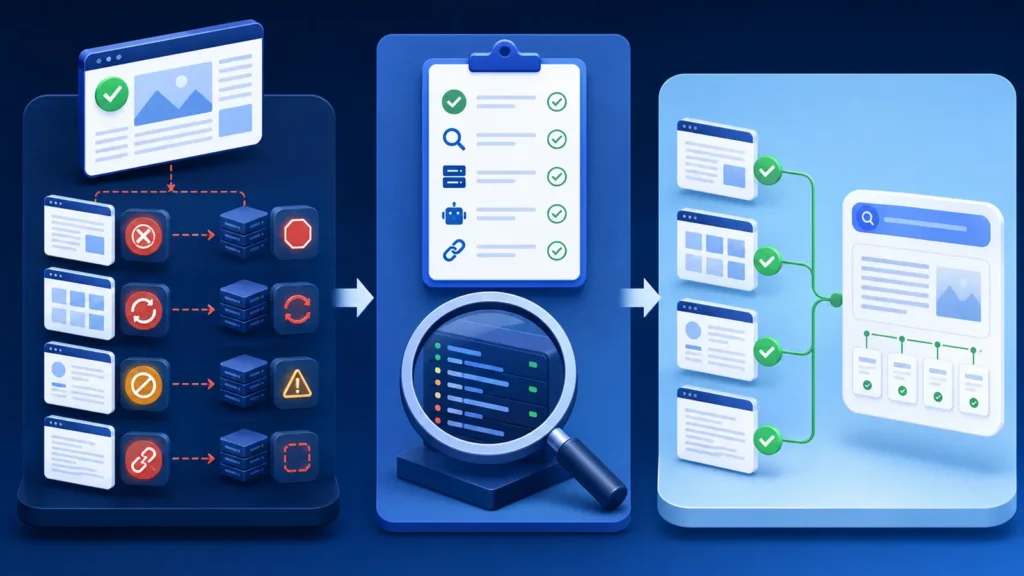
Apply the smallest change that addresses the proven failure. If a WAF rule blocks one verified crawler range on /blog/, change that condition; do not open the entire site to unverified bots. If access passes and the problem is citation selection, do not weaken security repeatedly.
Verification: exact evidence that proves the fix
Define a technical pass condition before editing anything. For each representative inner URL, the normal request and a controlled crawler-identity request should reach the intended canonical URL, return 200, deliver meaningful HTML, avoid authentication or challenge pages, and show no blocking event in the relevant security logs.
- Retest the homepage and the same three inner URLs after deployment.
- Confirm robots.txt returns 200 and the intended OAI-SearchBot rule applies to each path.
- Confirm redirects end once at the preferred canonical URL.
- Check the response body contains the intended H1 and main answer, not a challenge or empty shell.
- Review CDN and origin logs for status, rule action and source IP.
- Repeat the unchanged ChatGPT prompt matrix over several dates.
- Keep technical accessibility and actual citation results as separate measurements.
Resolved means evidence improved at the failed layer. A technical fix is proven when the representative pages become consistently retrievable under the defined test. A visibility improvement is proven only by repeatable discovery, mention or citation gains across the fixed prompt set. One citation is encouraging, not a permanent guarantee.
When the website is healthy but ChatGPT still does not cite it
If every access and rendering check passes, move the investigation from infrastructure to usefulness. Compare the cited sources with your page. Does your inner page answer the exact question early? Does it provide an original test, data, screenshot, worked example or clearly sourced fact? Is the information current and attributable? Is the page about one coherent intent, or is the useful answer buried inside generic marketing copy?
Do not create dozens of near-duplicate pages or rewrite the article after every prompt. Improve one defensible source, document what changed and allow time for discovery. OpenAI’s guidance explains how to permit search crawling, but it does not promise inclusion or citation.
Common interpretation mistakes
- Assuming the homepage proves that the whole domain is accessible.
- Confusing ChatGPT-User with OAI-SearchBot.
- Treating a spoofed user-agent string as verified OpenAI traffic.
- Reading a 200 status without checking the returned content.
- Changing prompts between tests and calling the results comparable.
- Assuming every AI platform discovers and cites sources the same way.
- Believing one answer is a permanent index entry.
Frequently asked questions
Why can ChatGPT access my homepage but return an error for blog posts?
The blog directory may have different robots rules, firewall conditions, redirects, authentication, cache behavior or rendering than the root path. Compare one homepage and several post URLs through the same HTTP and log checks.
Should I allow GPTBot to appear in ChatGPT search?
The relevant automatic search crawler is OAI-SearchBot. GPTBot relates to potential training use. OpenAI documents these controls independently, so configure each according to your goals.
Does ChatGPT-User obey robots.txt?
OpenAI states that ChatGPT-User supports certain user-initiated actions and robots.txt rules may not apply in the same way. It is not used to determine ChatGPT search inclusion. Use OAI-SearchBot rules for automatic search crawling.
Can Cloudflare block only inner pages?
Yes. Path expressions, managed challenges, rate limits, bot scores, country rules and application firewalls can produce different outcomes for / and deeper routes. Use security-event evidence to identify the exact rule.
Will fixing crawler access guarantee a citation?
No. It removes an access barrier. Discovery, relevance, source quality and query-specific selection remain separate stages.
Next step
When ChatGPT can open the homepage but not inner pages, test four URLs, identify the first failed layer and preserve before-and-after evidence. Start with the AI Search Readiness checklist, then use the crawler testing tutorial and AI crawler IP verification guide for deeper diagnosis.
Official sources: OpenAI: overview of crawlers; OpenAI: publishers and developers FAQ.