
A free website discoverability scanner helps you find out whether search engines and AI systems can reach, interpret and use your public pages. Instead of returning a mysterious score, a useful scan follows the page request from the URL through crawler access, server response, rendered content and discovery signals. It should show the evidence behind every result so you know what to fix first.
Visible Pilot’s scanner is being prepared for release. This guide explains the framework behind it and gives you practical manual checks you can run today. When the automated check becomes available, the intended experience is simple: paste a public URL, start the scan and review the results without creating an account.
Quick promise: Use one URL to uncover discoverability barriers affecting Google Search and AI discovery, then receive prioritized evidence and recommended fixes. Pre-launch note: the automated scanner is not live yet; join early access or follow the manual checks below.
What a free website discoverability scanner should check
Discoverability is a chain. If any link breaks, a well-written page may remain difficult to find or understand. A scanner should separate technical access problems from content and identity problems instead of mixing everything into one score.
- URL and response health: validates the address, follows redirects, records the final URL and checks whether the page returns a stable, useful response.
- Crawler access: reviews robots.txt, page directives and response headers for instructions that could prevent intended discovery.
- Bot protection and delivery: identifies challenge pages, rate limits, firewall blocks, timeouts or different responses that may prevent an automated visitor from reaching the content.
- Rendered content: checks whether meaningful headings, text and links exist in the initial HTML or only appear after scripts run.
- Search and AI signals: reviews canonicals, titles, descriptions, internal links, structured context and evidence that help systems identify the correct page and topic.
- Content usefulness: looks for a direct answer, logical headings, specific claims, clear ownership and supporting information a reader can verify.
These checks diagnose readiness, not guaranteed rankings or citations. Search and AI platforms make their own decisions, and their behavior changes. The purpose of the scan is to expose barriers you control.
How the free website discoverability scanner works: request path, tests and scoring rules
The proposed workflow starts with the exact URL you submit. It normalizes the address, checks robots instructions, requests the page, follows safe redirects and records the final response. It then inspects headers and HTML, compares the canonical URL, identifies indexing directives, evaluates important page elements and, where possible, compares the raw page with a rendered version.
Every test should return its evidence: the requested URL, final URL, response code, relevant directive, detected element or missing signal. Visible Pilot’s planned score groups tests into five dimensions rather than awarding points for dozens of cosmetic recommendations.
| Dimension | What is evaluated | Typical blocking issue |
|---|---|---|
| Reachability | URL, redirects, status and stability | Timeout, redirect loop or error response |
| Crawler access | Robots rules, headers and page directives | Disallow rule or unintended noindex |
| Content delivery | Useful HTML and rendered main content | Empty shell or challenge page |
| Page signals | Canonical, title, headings and internal links | Conflicting canonical or unclear structure |
| Clarity and evidence | Entity identity, direct answers and support | Vague ownership or unsupported claims |
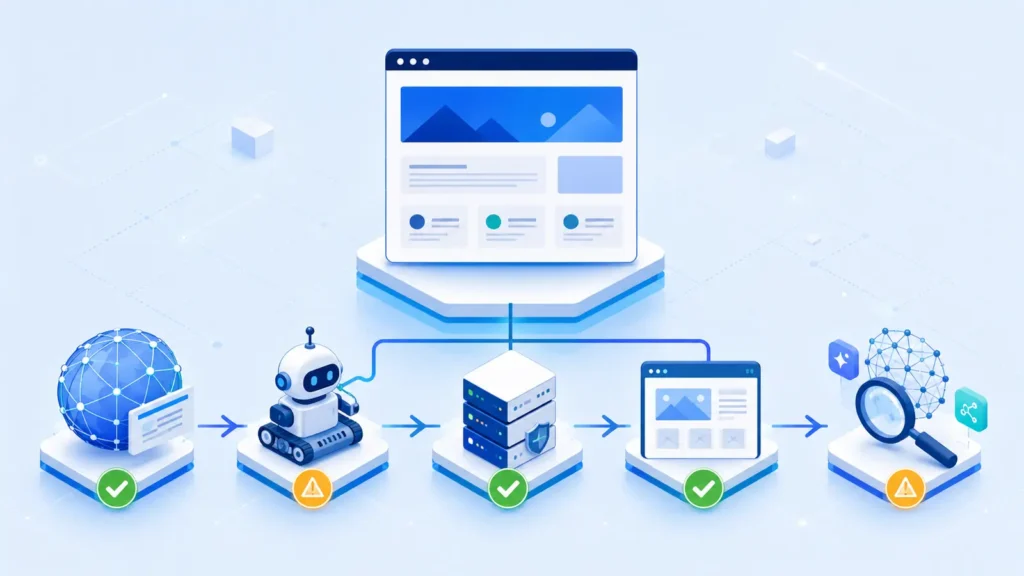
Known limit: one scan is a snapshot from one request path. Location, device, authentication, rate limits, temporary server load and personalized delivery can change the response. An inconclusive result should trigger a retest, not an automatic failure.
Free website discoverability scanner results: pass, warning, fail and inconclusive
A green pass means the scanner found the expected condition and preserved the supporting evidence. An amber warning means the page is reachable but a signal is ambiguous, inconsistent or worth reviewing. A red failure means an observable condition blocks or seriously weakens the tested stage. Inconclusive means the scanner could not make a reliable determination.
| Status | Meaning | Recommended action |
|---|---|---|
| Pass | The tested condition is present and working | Keep the evidence and monitor after major changes |
| Warning | The page works, but a conflicting or weak signal needs review | Compare evidence with the intended setup |
| Fail | A reproducible barrier prevents the tested stage | Fix the blocker, then rerun the same URL |
| Inconclusive | The request did not produce enough reliable evidence | Retest and verify manually from another environment |
Recommendations should remain specific. “Improve SEO” is not a fix. “Remove the unintended noindex directive from the canonical page, clear the cache and retest” is actionable because it names the evidence, the change and the validation step.
Example result: a healthy page versus a blocked page
Imagine a healthy service page. The submitted URL resolves once to HTTPS, returns a stable successful response, is allowed by robots rules, contains its main copy in the delivered HTML, points to itself as canonical and links to related pages. The report can pass reachability and access while warning that the organization name or supporting evidence is unclear. The site owner has a focused content task rather than a false technical emergency.
Now consider a blocked page. A normal browser displays the article, but an automated request receives a challenge page or access-denied response. The scanner should fail the relevant access test, display the observed response and avoid scoring content it never received. The recommended next step is to review firewall or bot-protection rules with the hosting provider, allow the intended crawler class where appropriate, and retest without weakening security for everyone.
Privacy and data handling for a free website discoverability scanner
A responsible scanner should request only the public URL and the resources needed to evaluate it. The planned Visible Pilot workflow excludes passwords, private dashboards, checkout details and pages that require authentication. It should store the minimum diagnostic data needed to display evidence, prevent abuse and improve test reliability, with a clear retention policy available before launch.
Safe scanning rule: submit only a public page you are authorized to test. Never paste credentials, private preview links, customer data or sensitive query parameters into a public diagnostic tool.
Troubleshooting a free website discoverability scanner: invalid URLs, bot protection and timeouts
If a scan cannot finish, start with the simplest explanation. Include the full protocol, such as https://, and test a single public page rather than a dashboard or login URL. Open the address in a private browser window to confirm that it does not rely on your session. Remove tracking parameters and try the canonical page.
For repeated redirects, compare the submitted address with the final preferred URL and review HTTP-to-HTTPS, www-to-non-www and trailing-slash rules. For a timeout, retry after a few minutes and check server monitoring. If bot protection intervenes, inspect firewall events before changing rules. A temporary bypass may hide the cause, while a narrow, documented rule lets you preserve security and verify the intended crawler access.

Manual checks to verify the result
Automated evidence is most useful when you can reproduce it. Begin with your browser’s developer tools or a command-line header request to confirm the status and redirects. Open /robots.txt on the same host and review the rules that apply to the crawler you care about. View the page source and search for the title, main heading, canonical URL and primary answer. Then compare the source with the rendered page.
- Confirm the preferred page returns a successful response without a redirect chain.
- Check that robots rules and page-level directives match your publishing intention.
- Verify that the canonical points to the correct indexable URL.
- Make sure important text and links are present without requiring user interaction.
- Follow internal links from relevant pages and ensure they lead to the preferred URL.
- Use the website health guide for broader diagnosis and the website health checklist for AI and Google Search for a repeatable review.
Frequently asked questions
How accurate is a website discoverability scanner?
It can accurately report the response and signals observed during its test, but it cannot promise indexing, rankings, AI mentions or citations. Treat the report as diagnostic evidence and reproduce important failures manually.
Which websites will be supported?
The planned check targets publicly accessible websites regardless of CMS. Pages behind authentication, private staging systems and restricted dashboards are outside the intended scope.
How often should I scan a page?
Run a check after launches, migrations, domain or CDN changes, firewall updates, template releases and major content changes. For stable pages, a monthly or quarterly review is usually more useful than constant retesting.
Why can two scans produce different results?
Server load, network location, caching, bot protection, rate limits and temporary outages can change what a request receives. Compare timestamps and evidence, then repeat the test before treating a one-off result as a confirmed defect.
Does a passing result guarantee AI visibility?
No. A pass means the tested barriers were not observed. Platforms still decide what to crawl, index, retrieve, mention and cite. Strong, original and well-supported content remains necessary.
Run the free Visible Pilot check
Visible Pilot is building the free website discoverability scanner described here. Join early access to be notified when the no-sign-up check is ready. Until then, use the manual steps above to document your baseline and keep the exact URL, response evidence and fix history together.
Get early access to the free website discoverability scanner. Be first to test a public URL and receive transparent pass, warning, fail and evidence-based recommendations.