

Gemini cannot find my business website is a frustrating symptom, but it does not point to one single fault. Your site may be absent from Google’s index, technically inaccessible, unclear about the business it represents, or simply not selected for a particular Gemini answer. The fastest solution is to test each stage separately instead of changing everything at once.
Short answer: first confirm that Google can crawl, render and index the exact business pages. Then make your name, services, location and contact facts consistent across the website and eligible Google Business Profile. Finally, repeat the same Gemini prompts in fresh sessions. A technically healthy site can still be omitted from an answer because citation and retrieval are query-dependent.
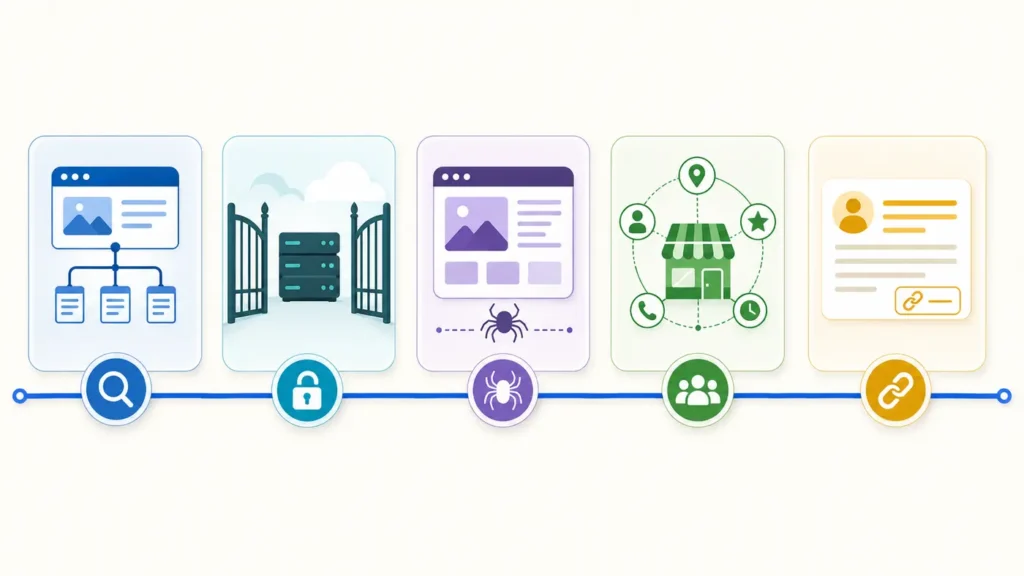
Quick diagnosis: why Gemini cannot find your business website
Start by asking what “cannot find” means. Does Gemini say the business does not exist? Does it know the company but quote an old address? Does it mention competitors without linking to you? Or can it open the homepage when given a URL but fail to answer questions about services? Each symptom belongs to a different layer.
- The important page is not indexed by Google or was discovered only recently.
- Robots rules, a
noindexdirective, login requirement, firewall or server error prevents access. - The page renders little useful text until JavaScript runs, or critical resources are blocked.
- Business facts are incomplete or conflict across the website, Business Profile and trusted listings.
- The prompt is vague, highly competitive or does not match the page’s subject closely enough.
- Gemini found the business but chose not to mention or cite it in that particular response.
Symptom map: access, indexing, understanding or citation
| Observed symptom | Most likely layer | First evidence to check |
|---|---|---|
| The URL is absent from Google Search | Discovery or indexing | Search Console URL Inspection and sitemap status |
| Google shows the page, but facts are wrong | Entity clarity or stale information | Visible page content and Business Profile details |
| Homepage works, service pages do not | Internal access, rendering or linking | Status codes, robots rules and rendered HTML |
| Gemini mentions the brand without a link | Retrieval or citation selection | Repeatable prompts and cited-source record |
| Gemini cannot answer after receiving the URL | Page delivery or content clarity | Fetch response, main text and structured data |
Do not use one Gemini answer as an index checker. Generative answers can change by prompt wording, location, session context and product mode. Use Google Search Console and direct technical evidence to establish crawl and indexing status; use Gemini prompts only to measure answer behavior.
Test 1: reproduce the issue on representative URLs
Choose three URLs: the homepage, the most important service or product page, and a useful article that answers a customer question. Record the canonical URL, HTTP status, index status, last meaningful update and the exact Gemini prompt used. This prevents a common mistake: fixing the homepage when the missing evidence actually lives on an inner page.
Run a normal Google search for the brand and inspect each URL in Search Console. Google explains that discovery, crawling and indexing are separate processes; a known URL is not automatically crawled or indexed. If URL Inspection reports a block, redirect, duplicate canonical or server failure, fix that evidence before changing copy.
Test 2: use a fixed Gemini prompt set
Open fresh sessions and repeat a small, stable set of prompts. Test a branded question, a service-plus-location question and a problem-led question. For example: “What does [business] do?”, “Which companies provide [service] in [city]?” and “Who can help with [specific problem]?” Record whether the site is found, the business is mentioned, a fact is correct and a URL is cited. These are four separate outcomes.
- Keep wording identical during the baseline and retest.
- Run the test on more than one day rather than drawing conclusions from a single answer.
- Save the answer, cited URLs, date, account state and location.
- Do not claim a visibility gain unless the same test design shows a repeatable change.
Root-cause checks in the right order
1. Confirm crawl and index controls
A robots.txt file controls which URLs a crawler may request; Google explicitly warns that it is not the correct way to keep a page out of Search. Check the final URL for a noindex robots meta tag or X-Robots-Tag, and make sure the canonical points to the intended page. Also confirm that the XML sitemap contains the canonical URL and returns a successful response.
Test the page without an authenticated session. A 200 response in your browser does not prove Googlebot receives the same result: CDNs and security tools can serve 403, 429, challenge or empty responses based on user agent, IP, cookies or rate limits.
2. Inspect rendered content
Google can render JavaScript, but rendering is a separate stage and blocked resources can prevent it. Put essential business facts—company name, offer, location or service area, proof, contact route and main page purpose—in meaningful HTML. If the rendered page contains navigation and animations but no explanatory copy, an AI system has little reliable evidence to retrieve.
3. Clarify the business entity
Use the same official business name, URL, phone number and address wherever those details apply. Create a focused About page, clear service pages and a contact page. Add accurate Organization or LocalBusiness structured data that matches visible content. Google says structured data helps it understand a page, but markup does not replace helpful visible information or guarantee a special result.
For an eligible storefront or service-area business, claim and verify the Google Business Profile, choose accurate categories and maintain hours, website, contact details and photos. Google Business Profiles are intended for businesses that meet customers in person; online-only businesses should not create an ineligible local profile.
4. Resolve conflicting or stale facts
Search for old addresses, discontinued services, duplicate profiles, previous brand names and inconsistent social biographies. Update first-party pages before chasing third-party mentions. If several sources disagree, Gemini may surface an older or more established version of the fact.
Local business note: a Business Profile can improve the quality and consistency of information Google holds about an eligible local business, but it is not a switch that forces Gemini to cite the website. Treat profile accuracy, website indexability and answer selection as related but separate checks.
Fixes ordered by impact, effort and risk
| Priority | Action | Why it comes first |
|---|---|---|
| Critical | Remove unintended noindex, access blocks, login walls and error responses | No content improvement can compensate for an inaccessible page |
| High | Correct canonicals, sitemap entries and internal links | Helps Google discover the preferred URL consistently |
| High | Add clear visible business and service facts | Improves retrieval and reduces ambiguity |
| Medium | Align Business Profile and authoritative listings | Strengthens consistent local and entity evidence |
| Medium | Add valid structured data matching visible content | Gives explicit machine-readable context |
| Improvement | Expand useful answers, examples and proof | Creates a stronger reason to retrieve or cite the page |
Make the smallest safe change that addresses the observed failure. If Search Console shows a noindex tag, remove that directive; do not redesign the whole site. If the page is indexed but Gemini confuses two businesses, strengthen entity facts and reconcile profiles. This one-variable approach makes the retest meaningful.
Verification: evidence that the issue is resolved
A technical fix passes when the intended URL returns 200, is crawlable, renders the main content, declares the correct canonical and can be indexed. An entity fix passes when the website and maintained profiles show the same facts. A Gemini visibility improvement passes only when the fixed prompt set produces a repeatable improvement across fresh sessions—not merely one favorable answer.
- Save before-and-after URL Inspection screenshots.
- Record response headers and rendered main text.
- Validate structured data and correct critical errors.
- Document the prompt, answer, citations, date and location.
- Retest after Google has recrawled and reprocessed the changed pages.
When the website is healthy but Gemini still does not cite it
Citation is not guaranteed. Google states that pages appearing in AI features must meet ordinary Search technical requirements, but satisfying those requirements does not guarantee crawling, indexing, serving or inclusion. The system may prefer a source that answers the query more directly, carries stronger evidence, is fresher for that topic or better matches the user’s location and intent.
At this stage, improve usefulness rather than adding speculative “AI tags.” Publish specific service explanations, original examples, prices or constraints where appropriate, author and business information, dated updates and source links. Build pages around real customer questions. The goal is to become the clearest source for a narrow query, not to force a model to repeat a slogan.
Interpret results carefully: a move from “not found” to “mentioned” is not the same as a citation, and a citation is not proof that one technical change caused it. Keep access, indexing, understanding, retrieval and citation as separate measurements.
Evidence worth collecting
For a useful diagnosis, capture the Gemini answer and citations, the Google result for the exact URL, Search Console’s index verdict, the live canonical and robots directives, the rendered page, Business Profile facts and the same details on the website. This evidence is more valuable than a proprietary visibility score with no explanation of how it was calculated.
Frequently asked questions
Does Gemini use the same index as Google Search?
Gemini products can use different tools, retrieval systems and context depending on the experience. For website troubleshooting, Google Search indexing is a necessary technical baseline for Search-based AI features, but you should not assume every Gemini response behaves like a conventional result page.
Should I block Google-Extended?
Google-Extended is a control token related to certain generative AI uses; Google’s Search documentation says it does not affect inclusion in Google Search or AI features such as AI Overviews. Do not confuse it with Googlebot crawl and index controls.
Will LocalBusiness schema make Gemini find me?
Accurate structured data can help Google understand the business information on a page, but it cannot guarantee indexing, ranking, retrieval or citation. It must describe content users can actually see and follow Google’s structured-data rules.
How long should I wait after fixing the website?
There is no fixed Gemini timeline. Google must discover, recrawl and process the changed URL, and answer selection can still vary afterward. Track the recrawl and index evidence first, then repeat the same prompt set over a defined observation window.
Do I need a Google Business Profile?
An eligible local business should claim and verify its profile to control key facts shown on Search and Maps. Online-only businesses are not eligible for a local Business Profile, so they should focus on a clear, indexable website and consistent organization information.
Sources and next step
Technical guidance used in this article: Google Search and AI features, How Google Search works, robots.txt guidance, LocalBusiness structured data, and Google Business Profile eligibility.
For a broader diagnosis, use the AI search indexing problems guide. You can also compare this workflow with why Claude ignores a website to see which tests are platform-specific.
Next step: Get the AI Search Readiness checklist and test your homepage, primary commercial page and best knowledge article with the same evidence-based process.