

If you want your pages to be eligible for inclusion in ChatGPT search results, your website must allow the crawler OpenAI uses for search. This guide gives you a practical OAI-SearchBot robots.txt example, then shows how to test the complete request path instead of assuming one line has solved everything.
Quick answer: add a specific OAI-SearchBot group with Allow: /, publish it at your domain root, and confirm your CDN or firewall accepts requests from OpenAI’s published search-crawler IP ranges.
What OAI-SearchBot means in practical terms
OAI-SearchBot is OpenAI’s automatic search crawler. OpenAI’s current documentation says it is used to surface websites in ChatGPT search features. Its control is separate from GPTBot, which is associated with crawling content that may be used to improve and train generative AI foundation models.
You can permit OAI-SearchBot for search discovery while blocking GPTBot for training. ChatGPT-User is different again: it supports certain user-initiated actions, is not an automatic web crawler, and does not determine whether a page may appear in ChatGPT search.
| Crawler | Primary role | Robots.txt decision |
|---|---|---|
| OAI-SearchBot | Automatic crawling for ChatGPT search | Manage search crawling |
| GPTBot | Crawling related to improving and training models | Control independently |
| ChatGPT-User | Certain user-triggered visits | Not the search inclusion control |
Important: allowing OAI-SearchBot makes crawling possible; it does not guarantee indexing, ranking, citation, or inclusion in an answer. Content quality, relevance, canonicalization, and other search systems still matter.
The simplest OAI-SearchBot robots.txt example
For a site that wants to allow the search crawler across all public paths, use this explicit group:
User-agent: OAI-SearchBot
Allow: /
Serve these directives at https://yourdomain.com/robots.txt. A copy in a subdirectory does not control the whole host.
Allow OAI-SearchBot but block GPTBot
If your policy is to participate in ChatGPT search while opting out of GPTBot crawling, keep the groups independent:
User-agent: OAI-SearchBot
Allow: /

User-agent: GPTBot
Disallow: /
OpenAI says these settings operate independently, so do not use one group to communicate a preference meant for another crawler.
Allow public pages but protect private paths
User-agent: OAI-SearchBot
Allow: /
Disallow: /account/
Disallow: /checkout/
Disallow: /internal-search/
Disallow: /staging/
Robots.txt is public. Never list a secret URL expecting it to remain hidden. Authentication, authorization, and server-side controls—not crawler directives—must protect sensitive material.
Step 1 — Establish a clean baseline
Before editing anything, record the current robots.txt response and choose representative URLs: the homepage, a normal article, and a path that should remain blocked. Save the HTTP status, final URL after redirects, response headers, and expected matching rule.
- Confirm robots.txt returns HTTP 200 on the exact hostname.
- Check www and non-www hosts if both can be requested.
- Inspect the production response, not only a CMS editor.
- Note wildcard groups that may conflict with your intention.
Step 2 — Compare a browser request with a controlled crawler request
Request each test URL normally, then repeat the request with an OAI-SearchBot user-agent string. This can reveal naive user-agent blocking, but it is only a diagnostic. Anyone can copy a user-agent string, so the string alone cannot prove a request came from OpenAI.
curl -I https://example.com/robots.txt

curl -I \
  -A "Mozilla/5.0 (compatible; OAI-SearchBot/1.0; +https://openai.com/searchbot)" \
  https://example.com/important-page/
Do not hard-code the version as an identity check. OpenAI notes that version numbers may change. For real allowlisting, verify against the current published IP ranges.
Step 3 — Separate access, rendering, and content failures
A valid robots.txt rule answers one question: does the declared crawling policy allow this URL? A crawler can still fail later. Diagnose each layer separately.
| Layer | Evidence | Typical failure |
|---|---|---|
| Robots policy | Matching group and path rule | A disallow covers the URL |
| HTTP access | Status, redirects and headers | 401, 403, 429, loop or 5xx |
| CDN / WAF | Security event and rule ID | Bot score, rate limit or challenge |
| Rendering | Server HTML and resources | Empty shell or blocked assets |
| Content signals | Canonical, noindex and substance | Wrong canonical, noindex or soft 404 |
A 200 response is necessary but not sufficient. A challenge page can return 200 while hiding the real content. Compare the body, content type, title, canonical URL, and page substance—not only the status code.
Step 4 — Apply the smallest safe fix
Change only the layer that failed. If robots.txt blocks the crawler, update the matching group. If a CDN rule blocks verified OpenAI search-crawler addresses, adjust that policy. If the origin rate-limits normal crawling, tune the limit conservatively instead of disabling protection for everyone.
- Back up the current robots.txt content or CMS setting.
- Add or correct the explicit OAI-SearchBot group.
- Purge the relevant edge cache if robots.txt is cached.
- Update only the confirmed CDN or WAF rule.
- Record the change, reason, owner, and rollback method.
Step 5 — Retest and define a pass condition
Retest the same URLs with the same method. OpenAI says search systems may take about 24 hours to adjust after a robots.txt change, so distinguish an immediate technical pass from later discovery or visibility.
- Robots.txt returns 200 on the correct host.
- The OAI-SearchBot group allows the intended URL.
- The target resolves to one stable, crawlable 200 response.
- No CDN or WAF event blocks verified search-crawler IPs.
- The page returns meaningful HTML and the intended canonical.
- Logs show an allowed request when an authentic crawl occurs.
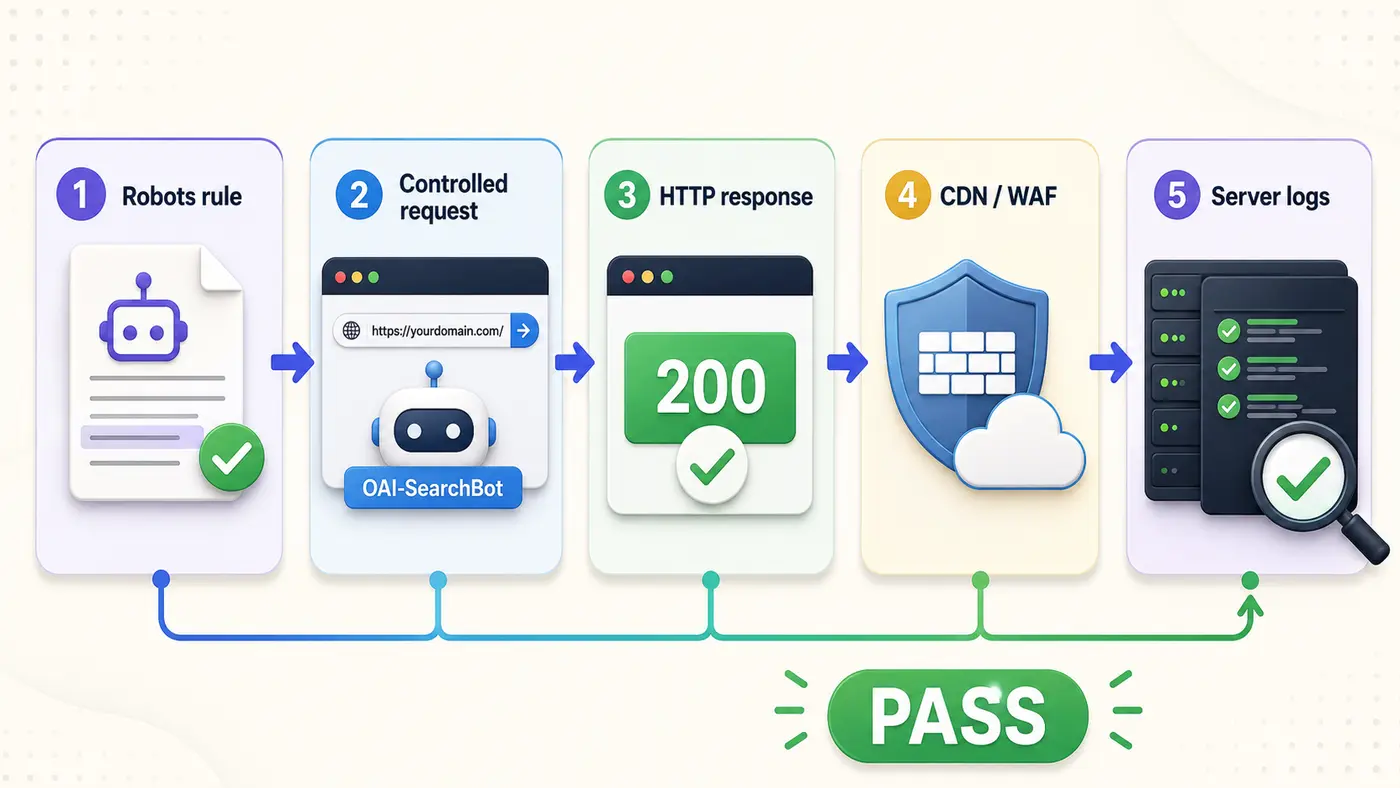
OAI-SearchBot verification workflow
Use these five checks as a repeatable troubleshooting sequence. They separate policy, request behavior, network security, and logs so one green check cannot hide a downstream failure.
Worked example: from blocked to verified
Imagine a SaaS knowledge base at example.com/guides/. Its robots.txt lacks an explicit OAI-SearchBot group, while the CDN runs an aggressive managed-bot challenge.
| Stage | Observation |
|---|---|
| Baseline | Browser receives the guide, but the crawler-style request gets 403. |
| Robots check | The intended permission is not stated explicitly. |
| Fix | Add the allow group and configure the edge policy for published searchbot IP ranges. |
| Retest | Robots.txt and the guide return the real content with stable 200 responses. |
| Result | Technical access passes; search appearance is monitored separately. |
The robots.txt edit communicates permission, while the WAF change enables the network request. Both can be required, and neither proves that the page will be cited.
Evidence and screenshots to save
- The live robots.txt response with the OAI-SearchBot group visible.
- Headers and final status for each representative URL.
- Redirect chains, including host and protocol changes.
- CDN or WAF event IDs, timestamps, and the acting rule.
- The current OpenAI-published IP range source.
- Origin log entries showing time, path, response, and verified source.
Security note: do not publish raw logs containing visitor IPs, sessions, query strings, or private paths. Redact sensitive information before sharing evidence.
Common interpretation mistakes
Treating a copied user-agent string as proof
A user-agent header is self-declared and easily spoofed. Verify authentic requests against OpenAI’s current published searchbot IP ranges and your server logs before granting special access.
Editing the wrong robots.txt file
Hosts can behave differently through redirects, proxies, multisite setups, or CDNs. Test the public file on the exact production hostname crawlers reach.
Forgetting caches and generated files
CDNs, reverse proxies, SEO plugins, and deployments can cache or regenerate robots.txt. Purge the correct cache and confirm the live response after publishing.
Assuming robots.txt overrides noindex or authentication
Robots.txt manages crawler policy. It does not remove authentication, fix noindex, select the correct canonical, or make an empty JavaScript shell understandable.
Frequently asked questions
What is the correct OAI-SearchBot robots.txt example?
For site-wide permission, use User-agent: OAI-SearchBot followed by Allow: /. Then confirm the live file, HTTP access, CDN or WAF behavior, and logs.
Can I allow OAI-SearchBot and block GPTBot?
Yes. OpenAI documents the controls as independent. Use separate groups so search-crawling and training-crawling preferences are explicit.
Does allowing OAI-SearchBot guarantee a ChatGPT citation?
No. Permission removes one access barrier, but does not guarantee discovery, selection, ranking, inclusion, or citation.
How quickly does a change take effect?
The live file can change immediately after publishing and cache purging. OpenAI states that search systems may take approximately 24 hours to adjust.
Should I allowlist by user agent or IP address?
Use robots.txt to express policy and verify network identity using OpenAI’s published searchbot IP ranges. Do not trust the user-agent string alone.
Next step: audit the complete crawler path
Start with the AI Crawler Access and Blocking Guide, compare roles in ChatGPT-User vs GPTBot vs OAI-SearchBot, and use AI crawler blocked by robots.txt for deeper troubleshooting.
Use the Visible Pilot AI Search Readiness checklist to document the robots rule, HTTP evidence, edge-security decision, canonical signals, and final pass condition in one repeatable review.
Sources
- OpenAI crawler documentation — crawler roles, independent controls, user-agent examples, and adjustment timing.
- OpenAI OAI-SearchBot IP ranges — current published ranges for verification and edge-policy maintenance.