

If your website is not appearing in Perplexity, do not assume the platform has permanently excluded it. The failure may happen at crawler access, page delivery, content understanding, retrieval, or citation selection. Each layer needs different evidence and a different fix. This guide gives you a repeatable way to isolate the problem without treating one answer as a permanent index.
Fast answer: First confirm that PerplexityBot can access representative pages, returns a normal 200 response, and receives useful rendered content. Then test the same prompt set across fresh sessions and record whether your site is found, mentioned, or cited. Technical readiness removes barriers, but it cannot guarantee a citation.
Quick diagnosis: why a website is not appearing in Perplexity
Most cases fall into one of five buckets. Start with the observable symptom instead of changing many settings at once.
- Crawler policy: robots.txt blocks PerplexityBot, or a broader rule applies unexpectedly.
- HTTP or security failure: a CDN, WAF, rate limiter, bot-management rule, login wall, or origin server returns 401, 403, 429, 5xx, or a challenge page.
- Weak page delivery: the URL returns 200, but the useful answer is absent from the initial HTML, hidden behind interaction, or replaced by thin boilerplate.
- Discovery or relevance gap: the page is crawlable, but internal links, canonical signals, topic focus, freshness, or entity clarity are weak.
- Citation-selection gap: the page is discoverable yet is not selected for a particular query because other sources fit the intent or provide stronger evidence.
Important distinction: Perplexity’s official documentation describes PerplexityBot as the crawler used to surface and link websites in search results. Perplexity-User supports certain user-triggered visits and is governed independently. A successful user-triggered fetch does not prove automatic discovery, and a successful crawler request does not promise selection in an answer.
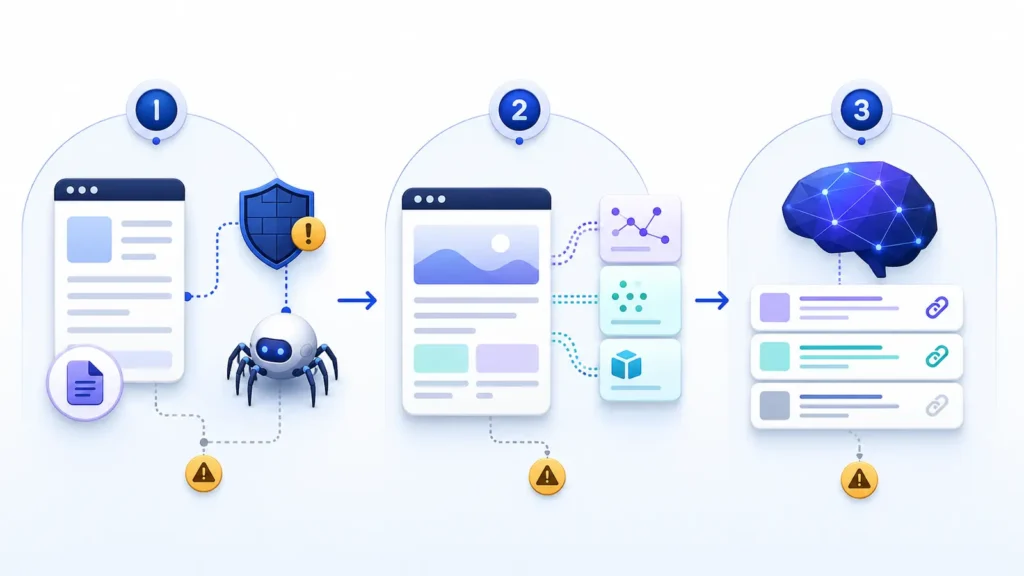
Symptom map: access failure, rendering failure, or discovery gap
1. Access failure
The crawler cannot retrieve the intended URL. Evidence may include a disallow rule, a blocked official IP range, a 403 response, an interstitial challenge, or repeated 429 responses. Fix this layer before changing copy or schema.
2. Rendering or content-delivery failure
The server responds, but the response does not contain the substantive text a retrieval system needs. Compare the raw response with what a browser shows. Important facts, headings, prices, definitions, author details, and source links should not depend entirely on a click or fragile client-side request.
3. Discovery, retrieval, or citation gap
The page is accessible and useful, but Perplexity does not retrieve or cite it for the tested prompt. This is not automatically a technical defect. The query may be too broad, the page may not directly answer it, the brand may be ambiguous, or competing sources may offer clearer evidence.
Test 1: reproduce the issue on representative URLs
Choose three pages: the homepage, a core product or service page, and a knowledge article that answers a narrow question. Testing only the homepage can hide template-specific blocks or weak internal discovery.
- Request each URL normally and record its final status code, redirect chain, canonical URL, response time, and content type.
- Repeat the request with the published PerplexityBot user-agent to reveal rules that treat crawler identities differently.
- Inspect robots.txt for a specific PerplexityBot group and for the wildcard group that may apply when no specific group exists.
- Review CDN, WAF, bot-management, and origin logs at the same timestamp.
- Confirm that the response contains the page’s unique title, main heading, core answer, and important internal links.
Do not trust a user-agent string alone. Anyone can send a request claiming to be PerplexityBot. When validating real traffic or creating an allow rule, combine the claimed user-agent with Perplexity’s current official IP ranges. The company says those ranges are updated regularly.
Test 2: run a fixed prompt set across fresh sessions
Technical tests tell you whether a page can be retrieved. Prompt tests tell you whether the platform actually finds, mentions, or cites it. Use five to ten prompts that represent real customer questions and keep the wording fixed for the baseline.
- Branded discovery: “What does [brand] do?”
- Product fact: ask for one verifiable capability stated on the site.
- Problem query: ask the narrow question answered by your article.
- Comparison query: include the category and decision criteria, not only competitor names.
- Source request: ask for supporting sources and inspect the cited URLs.
Run each prompt in fresh sessions, on more than one day, and record four separate outcomes: not found, found but not mentioned, mentioned without a link, and cited with a link. This prevents a single volatile answer from becoming a false pass or fail.
Root-cause checks
Crawler directives and index controls
Allowing PerplexityBot in robots.txt is relevant to Perplexity search discovery, but robots.txt is not the only control. Also check page-level noindex directives, X-Robots-Tag headers, canonical targets, redirects, authentication, and accidental staging rules.
CDN, WAF, and server behavior
Inspect the actual security event that matches the failed request. Broadly disabling protection is risky. Prefer a narrow rule that requires both the correct crawler identity and an address inside the official range. Recheck after changes; Perplexity notes that crawler-control updates may take up to 24 hours to be reflected.
Content clarity and evidence
A technically perfect page can still be a poor retrieval source. Put the direct answer near the relevant heading, identify the organization and author, use consistent product and entity names, support claims with primary evidence, show dates where freshness matters, and link to deeper pages with descriptive anchor text.
Site discovery architecture
Make the important article reachable through ordinary internal links, include it in the XML sitemap, avoid orphan pages, and keep canonical signals consistent. Search-oriented systems need a stable URL and a clear route to it.
Fixes ordered by impact, effort, and risk
- Critical, low effort: remove accidental robots or noindex blocks on pages intended for discovery.
- Critical, medium effort: correct WAF, CDN, or origin rules returning challenges, 403s, 429s, or 5xx responses to verified crawler traffic.
- High impact, low risk: expose the main answer and internal links in reliable HTML; correct redirects and canonicals.
- High impact, ongoing: improve topical fit, entity clarity, evidence, freshness, and internal linking.
- Avoid: blanket firewall bypasses, fake freshness, mass-produced near-duplicate pages, and conclusions drawn from one prompt.
Verification: evidence that proves the issue is resolved
Define a technical pass separately from a visibility pass. A technical pass means the representative URLs are allowed, return the intended 200 response without a challenge, deliver the expected main content, and appear in logs as verified requests when genuine traffic occurs. A visibility pass means the fixed prompt set produces repeatable discovery, mention, or citation improvement over several sessions.
Keep both baselines. If the technical pass succeeds but citations do not change, do not keep weakening security. Move the investigation to content fit, evidence quality, brand/entity clarity, authority, and prompt intent.
When the website is healthy but Perplexity still does not cite it
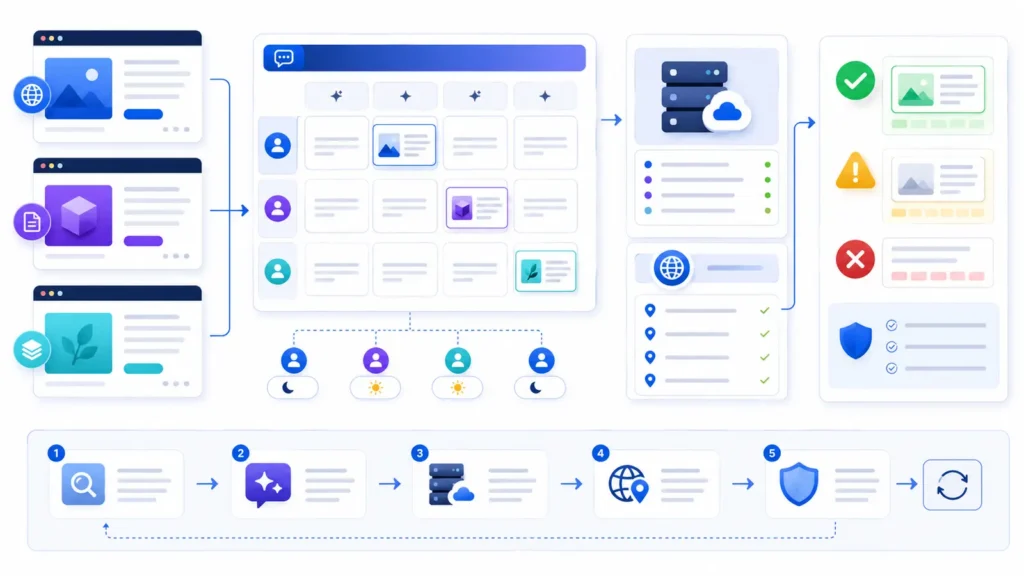
No crawler setting can force a citation. Perplexity may retrieve different sources by query, time, location, product mode, or available evidence. A healthy site can be omitted when its page answers a different intent, lacks a precise claim, duplicates stronger sources, or provides insufficient proof. Treat citation as an observed outcome, not a guaranteed indexing state.
Improve the page for the exact question: lead with a concise answer, add original examples or data, cite primary evidence, clarify the publisher and author, and make the URL the best source for one narrow job. Then rerun the same test matrix rather than inventing easier prompts.
Common interpretation mistakes
- Assuming that appearing once means the site is permanently indexed.
- Treating a user-triggered fetch as proof that PerplexityBot can crawl the site.
- Allowlisting any request that contains “PerplexityBot” without checking its source IP.
- Changing robots.txt when the real failure is a WAF challenge or weak page content.
- Expecting conventional Google rankings to guarantee visibility in every AI answer.
Frequently asked questions
Should I explicitly allow PerplexityBot in robots.txt?
If you want eligibility for Perplexity search discovery, an explicit allow rule can make intent clear. Still inspect the wildcard group, HTTP response, WAF behavior, and page-level controls because robots.txt alone cannot prove access.
How long should I wait after changing crawler rules?
Perplexity’s documentation says crawler-control changes may take up to 24 hours to be reflected. Retest the technical response immediately, then repeat visibility tests after the stated window and over several sessions.
Does a 200 response mean my site will be cited?
No. It proves only that the tested request received a successful HTTP response. Retrieval and citation also depend on usable content, query fit, evidence, authority, and platform behavior.
Can I test by changing curl’s user-agent?
Yes, but only as a controlled site-behavior test. It shows how your infrastructure treats that string; it does not authenticate the request as genuine crawler traffic.
Is Perplexity-User the same as PerplexityBot?
No. PerplexityBot supports automatic search discovery, while Perplexity-User supports certain user-triggered visits. Their controls and diagnostic meaning are different.
Next step
If your website is not appearing in Perplexity, start with three representative URLs and preserve the evidence before changing anything. Confirm access, delivery, content, and prompt outcomes in that order. Then use the AI search readiness checklist and the PerplexityBot 403 troubleshooting guide to work through the remaining failure layers.
Sources: Perplexity crawler documentation; current PerplexityBot IP ranges.