

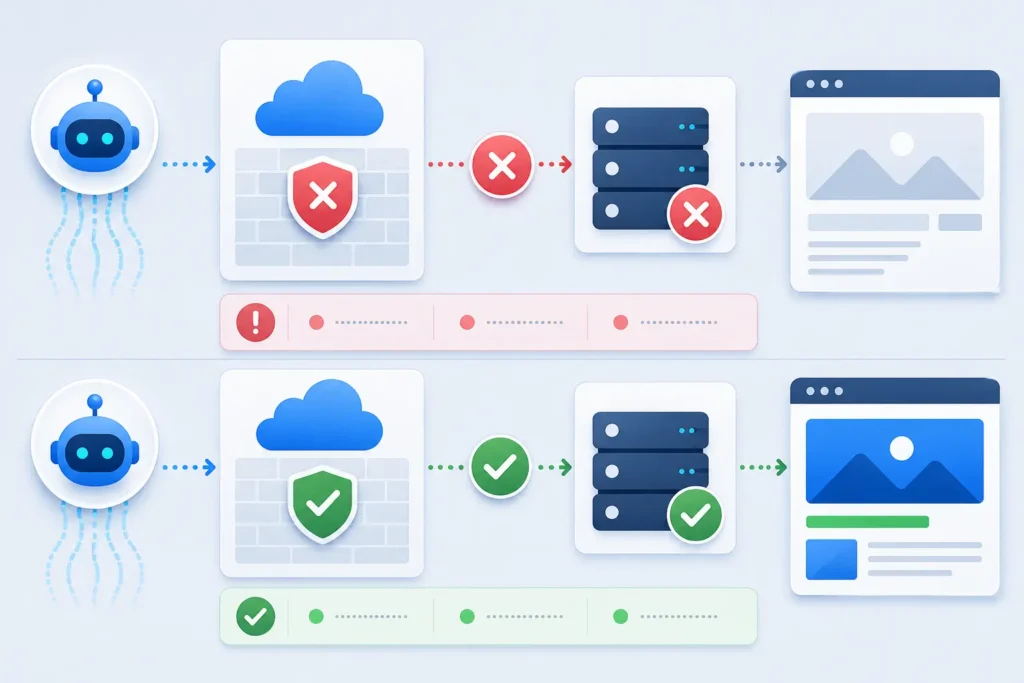
Cloudflare blocks ChatGPT from reading website content when a request is stopped, challenged, rate-limited, redirected, or served an unusable response somewhere between Cloudflare and the origin. The symptom may look simple, but the fix depends on which OpenAI agent is involved and which layer fails. This guide gives you a reproducible diagnostic path that preserves security while restoring access to the public pages you want AI search systems to read.
Quick answer: First identify whether you are testing OAI-SearchBot, ChatGPT-User, or GPTBot. Then compare the same public URL across a normal request, the relevant crawler identity, Cloudflare Security Events, and your origin logs. A successful fix produces an HTTP 200 response with the real page body—not a challenge page—and no conflicting robots.txt or firewall rule.
Quick diagnosis: why Cloudflare blocks ChatGPT from reading website
The most common cause is not a single “ChatGPT block.” Cloudflare can act at several layers: AI Crawl Control, Web Application Firewall custom rules, managed rules, bot protection, rate limiting, country or ASN restrictions, and browser challenges. Your origin server or WordPress security plugin can also deny the request after Cloudflare passes it through.
OpenAI documents three relevant identities. OAI-SearchBot supports ChatGPT search discovery; GPTBot relates to potential model-training use; and ChatGPT-User is used for certain user-triggered visits. These controls are independent. If your goal is visibility in ChatGPT Search, test OAI-SearchBot rather than assuming a successful browser visit proves crawler access.
| Observed symptom | Likely layer | Best evidence |
|---|---|---|
| 403 or branded block page | AI Crawl Control, WAF, bot setting, or origin security | Security Event action and matching request ID |
| 429 response | Rate limiting at Cloudflare or origin | Rate-limit event, headers, and timestamp |
| 200 with challenge or nearly empty HTML | JavaScript challenge, rendering, or application delivery | Response body, content length, and rendered DOM |
| Browser works, crawler fails | User-agent, IP, bot score, cookie, or challenge rule | Side-by-side headers and event logs |
| Page is accessible but never cited | Discovery, relevance, freshness, or authority gap | Crawl logs plus citation tests over time |

Symptom map: access failure, rendering failure, or citation gap
Access failure means the crawler cannot retrieve the URL. Look for 401, 403, 429, repeated redirects, a Cloudflare challenge, or a connection error. Rendering failure means the request returns 200 but the body lacks the main article, product information, links, or structured data. A discovery or citation gap begins only after access and content delivery are healthy: the platform can read the page but may not choose it for a particular answer.
Keep those stages separate. Allowing a bot through Cloudflare does not force ChatGPT to crawl, index, mention, or cite a page. It only removes one possible barrier.
Test 1: reproduce the issue on representative URLs
Choose three URLs: the homepage, a strong evergreen article, and a deeper conversion page. Record the exact time, hostname, final URL, status, response headers, response size, redirect chain, and first meaningful part of the HTML. Test both GET and HEAD only if your application supports HEAD correctly. Some sites configure HEAD differently, so GET remains the decisive test.
curl -sS -D headers.txt -o page.html -L https://example.com/important-page/
wc -c page.html
head -n 30 page.html
Next, repeat the GET with the current example user-agent from OpenAI’s crawler documentation. A user-agent string is easy to spoof, so this is a diagnostic comparison—not proof that a request came from OpenAI. For production allow rules, correlate Cloudflare’s crawler classification, the published OpenAI IP ranges, and your logs instead of trusting a string alone.
curl -sS -D crawler-headers.txt -o crawler-page.html -L \
  -A "Mozilla/5.0 (compatible; OAI-SearchBot/1.4; +https://openai.com/searchbot)" \
  https://example.com/important-page/
diff -u headers.txt crawler-headers.txt
Test 2: compare headers, redirects, body content, and timing
A status code alone can mislead you. Compare the final content type, cache status, server timing, content length, canonical URL, robots meta tag, and visible body copy. A Cloudflare challenge can return HTML that looks legitimate to a basic uptime check, while containing none of the page content an automated system needs.
Also test the canonical hostname and any www/non-www variant. A redirect may move the crawler to a hostname covered by different Cloudflare rules. If the first request succeeds but the redirected request fails, the problem is in the destination zone or origin configuration, not the starting URL.
Root-cause checks inside Cloudflare
Open Security Events and filter around your recorded timestamp, hostname, path, user agent, action, and source. The event shows which Cloudflare feature acted on or flagged the request. If no mitigated event appears, use Security Analytics or origin logs because the request may have passed Cloudflare and failed later.
Then review these controls in order: AI Crawl Control crawler action; WAF custom-rule order; managed-rule matches; rate limiting; bot protection; country, ASN, and IP rules; redirects and transforms; and any origin firewall or WordPress security plugin. Cloudflare explains that WAF rules can affect an AI crawler before AI Crawl Control, so setting a crawler to Allow does not override an earlier conflicting WAF rule.
Security caution: Do not create a blanket “allow any request containing OAI-SearchBot” rule. User-agent strings can be impersonated. Prefer the narrowest rule that works: verified crawler classification or official IP validation, public content paths only, safe methods such as GET/HEAD, and no bypass for login, checkout, account, API, or admin routes.
Robots.txt and crawler purpose must agree
Check /robots.txt directly through Cloudflare and confirm it returns 200 with the intended plain-text rules. If you want ChatGPT Search discovery, OpenAI recommends allowing OAI-SearchBot and its published IP ranges. You can still disallow GPTBot if you do not want content considered for training; those choices are independent.
User-agent: OAI-SearchBot
Allow: /

User-agent: GPTBot
Disallow: /
Remember that robots.txt is an instruction, not a network allow rule. Cloudflare’s managed robots.txt documentation distinguishes voluntary crawler directives from enforced blocking. A correct robots file cannot undo a WAF block or challenge. OpenAI also notes that search systems may take roughly 24 hours to adjust after a robots.txt change.
Fixes ordered by impact, effort, and risk
1. Correct the AI Crawl Control action
If OAI-SearchBot is blocked and you want search discovery, change that crawler to Allow in AI Crawl Control. Then confirm that no earlier WAF rule still blocks it. Cloudflare recommends managing known AI crawlers directly in AI Crawl Control for most cases and using WAF for more advanced path-specific behavior.
2. Remove conflicting broad WAF logic
Inspect rules that block all bots, challenge non-browser traffic, deny certain countries, or match unusual header patterns. Narrow the condition to the risky paths or traffic you actually intend to stop. Do not disable the entire WAF. If a Skip action is necessary, skip only the specific feature and only for validated crawler traffic on public paths.
3. Tune rate limits and browser challenges
Public articles should not require JavaScript, cookies, or an interactive challenge to return useful HTML. Adjust rate limits so normal crawler bursts do not receive 429 responses, while retaining strict limits for login, search, form, and API endpoints. Confirm that essential CSS is not required to expose the main text; the HTML response should already contain the core content.
4. Fix origin and cache inconsistencies
If Cloudflare shows no mitigation, check the origin access log, host firewall, reverse proxy, CMS security plugin, and application log. Compare cached and uncached responses. Purge only the affected cache entries after a fix, then test from a fresh session. A stale cached block page can make a corrected rule look broken.
Verification: evidence that proves the issue is resolved
Retest the same URLs with the same request method and recorded crawler identity. The fix is verified when each canonical URL returns a stable 200, the expected content type, the real page title and body, consistent canonical metadata, and no challenge markup. Cloudflare Security Events should show no mitigation for the allowed request, while origin logs should confirm delivery.
Pass criteria: robots.txt is reachable; OAI-SearchBot is allowed for the public paths you want discovered; response bodies contain the primary content; 403/429/challenge responses are gone; sensitive routes remain protected; and tests are repeated after cache purge and again after normal traffic conditions return.
When the website is healthy but ChatGPT still does not cite it
Once access is proven, move to content and evidence. A platform may not cite a page because it does not match the user’s intent, lacks a concise answer, is stale, duplicates stronger sources, has unclear entity information, or has little independent support. Improve the page’s opening answer, headings, first-party evidence, author information, dates, internal linking, and supporting citations.
Do not treat a missing citation as proof that Cloudflare still blocks ChatGPT. Crawl logs establish access; citation tests establish selection. They are different measurements. For another machine-readability check, see our llms.txt example for WordPress and the guide to common llms.txt mistakes.
Common interpretation mistake
The biggest mistake is testing only in a full browser. Your browser brings JavaScript, cookies, a normal interaction history, and often a residential IP. A crawler may receive a different response based on its identity, IP range, request rate, or lack of cookies. Always preserve the raw response and compare it with the rendered page, Cloudflare events, and origin logs.
Frequently asked questions
Can Cloudflare block ChatGPT even when robots.txt allows it?
Yes. Robots.txt expresses crawler preferences, while Cloudflare can enforce network and application-security rules. AI Crawl Control, WAF, rate limiting, bot protection, or an origin firewall may still return a block or challenge.
Which OpenAI crawler should I allow for ChatGPT Search?
OpenAI says OAI-SearchBot is used to surface websites in ChatGPT search features. GPTBot relates to potential training use, and ChatGPT-User supports certain user-triggered actions. Decide separately which access you want.
Is changing the user-agent enough to test the fix?
No. It is useful for reproducing user-agent-dependent behavior, but it does not authenticate the requester. Verify the Cloudflare classification, official published IP ranges, security events, and origin logs before creating an exception.
Will allowing OAI-SearchBot make ChatGPT cite my website?
No. It removes a potential access barrier but does not guarantee crawling, selection, ranking, a mention, or a citation. Relevance, content quality, recency, entity clarity, and external evidence still matter.
Next step
Document your baseline before changing rules, apply the narrowest safe fix, and keep screenshots of the Cloudflare event, raw headers, response body, cache behavior, and origin log entry. Then run the AI Search Readiness checklist across the rest of the site so one corrected URL does not hide similar failures elsewhere.